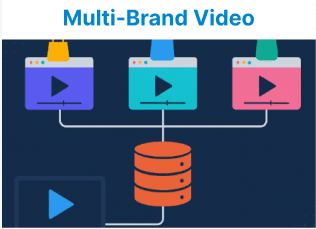
Multi-brand hosting allows video content to be delivered across multiple domains or brand environments using a centralized backend. This setup is suitable for platforms that serve different brand frontends while maintaining a unified system for managing video assets, transcoding, storage, and delivery. It simplifies infrastructure, avoids redundant setups, and ensures consistent control over video workflows.
Key Components of Multi-Brand Video Hosting
To set up multi-brand hosting from a single video backend, you need to understand the various components involved. These components should work in harmony to ensure that videos are delivered with brand-specific customizations without compromising performance or security.
Video Storage Backend is a centralized storage system (e.g., AWS S3, Google Cloud Storage) where video assets are stored. This backend must be able to handle video content from multiple brands while maintaining access control and organization.
Content Delivery Network is a CDN (e.g., CloudFront, Akamai) ensures global and fast delivery of video content across different regions while supporting branding-specific caching and edge optimizations.
Video Transcoding Service is a service (e.g., AWS Elemental MediaConvert, FFmpeg) responsible for transcoding videos into different formats for playback across various devices, including HLS, MP4, or DASH.
API Layer is an API (e.g., RESTful, GraphQL) to fetch and deliver video data dynamically, which handles video metadata, branding, access controls, and any customization per brand.
Authentication and Authorization are systems to ensure that videos are accessible only to the right users and brands, typically through role-based access control (RBAC) or user authentication via OAuth2.
Setting Up the Video Storage System
Ensure your video storage backend can handle multiple brands without overlap. Using a centralized storage system like AWS S3 enables you to manage video assets from different brands within a single bucket. However, an effective method to separate and tag the content by brand is necessary for organization and access control.
Folder Structure for Multi-brand Hosting:
To organize the content for multiple brands, you can use a directory-based structure within the storage backend:
/videos
/brand-a
/video-1.mp4
/video-2.mp4
/brand-b
/video-3.mp4
/video-4.mp4
By storing each brand's content in a specific folder, you can easily manage content, apply brand-specific settings, and ensure that access control is properly implemented.
Video Transcoding for Multi-Brand Hosting
Transcoding videos to adaptive bitrate formats like HLS, MP4, or DASH ensures that content can be accessed across a wide range of devices and network conditions. You will need to set up a transcoding service (e.g., AWS Elemental MediaConvert or FFmpeg) to process the uploaded videos and deliver them in brand-specific formats.
Transcoding Workflow:
- Upload Videos to S3: Videos are uploaded by users or content managers to the central video storage.
- Trigger Transcoding: Once a video is uploaded, an event can trigger a transcoding job (via Lambda function, AWS SNS, or a custom script).
- Generate Formats for Multiple Devices: Convert the video to different formats and bitrates (e.g., 1080p, 720p, 480p) to ensure compatibility across devices.
- Store Transcoded Outputs: Save the output in the appropriate folders corresponding to the brand.
Example with FFmpeg for Video Transcoding:
ffmpeg -i
input.mp4
-c:v libx264
-preset fast
-b:v 5000k
-f hls
-hls_time 10
-hls_list_size 5 /output/brand-a/stream.m3u8
This FFmpeg command converts a video into an HLS format suitable for brand "A" and saves it in the corresponding folder.
Brand-Specific Video Delivery via CDN
To deliver video content across multiple brands, you can set up a Content Delivery Network (CDN) to manage and serve the content based on brand-specific requirements.
Custom Domains: Each brand can have its own subdomain (e.g., brand-a.videos.com, brand-b.videos.com) to keep the video URLs distinct.
Path-Based Caching: Configure the CDN to cache videos separately for each brand, e.g., /brand-a/* and /brand-b/* to ensure that requests for each brand’s content are handled independently.
Secure Delivery: Use SSL certificates to ensure secure delivery for each brand's videos. Each brand can have its own SSL certificate for trusted, encrypted communication.
Example of Brand-Specific Video Fetching:
fetch(`/api/videos?brand=brand-a`)
.then(response => response.json())
.then(data => {
const videos = data.videos.map(video => video.url);
updateJWPlayerPlaylist(videos); // Dynamically update the video playlist
});
Dynamic Playlist and Video Embedding
You can build dynamic video playlists based on content categories, tags, or user interactions using APIs. The frontend will dynamically fetch video data and embed the correct content for each brand using custom JavaScript or a player SDK.
Example:
fetch(`/api/videos?brand=brand-a`)
.then(response => response.json())
.then(data => {
const videos = data.videos.map(video => video.url);
updateJWPlayerPlaylist(videos);
});
This example fetches video URLs for a specific brand from the API and loads them into a JW Player instance dynamically.
Example:
<iframe src="https://player.vimeo.com/video/{VIDEO_ID}?h={HASH}" frameborder="0" allow="autoplay; fullscreen" allowfullscreen></iframe>The h={HASH} ensures that each video is embedded securely, with a unique hash for each brand.
Access Control and Authentication
For managing user access to videos, you must implement strict access control mechanisms, especially when dealing with multiple brands. Role-based access control (RBAC) or user authentication (OAuth2) can be used to ensure that only authorized users can view videos.
Example:
Admin Role: Full access to all videos across brands.
Brand-Specific Roles: Users only have access to their respective brand’s videos.
if (userRole === 'brand-a-admin') { fetch(`/api/videos?brand=brand-a`) }Tracking and Analytics
Tracking user interaction with videos across different brands is crucial for understanding engagement and optimizing content. You can integrate JW Player’s analytics or build custom tracking to capture metrics such as watch time, playback errors, and user behavior.
Example:
jwplayer("player").on('play', function() {
console.log('Video started');
});
jwplayer("player").on('pause', function() {
console.log('Video paused');
});
This will log when a video starts and pauses, which can be used to track engagement.
Security Considerations
Security is paramount when handling videos from multiple brands. Use signed URLs or token-based authentication to protect access to videos. Additionally, using a secure connection (HTTPS) for video delivery and implementing IP whitelisting are essential steps.
Example:
const signedUrl = `${baseUrl}?token=${generateToken(userId)}`;This token can restrict access to video content, ensuring that only authorized users can view specific videos.