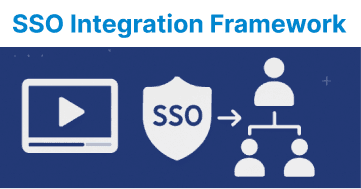
Single Sign-On (SSO) enables users to authenticate once and access all services in a streaming platform without repeated logins. Role-based access control (RBAC) defines what each user is allowed to access based on their role. Together, they help secure video content and streamline user permissions across the platform. This setup typically involves integrating an identity provider like Auth0 or AWS Cognito, managing authentication tokens, and enforcing role-based restrictions during content delivery.
SSO Integration in Streaming Platforms
SSO Workflow for Streaming Platforms
SSO allows users to authenticate once and access all the services and content in the streaming platform without the need to log in repeatedly. This is achieved using an identity provider (IdP) like Okta, Auth0, or AWS Cognito that securely authenticates users and provides tokens to be used across different services.
Example: Integrating SSO with Auth0
Here’s an example of integrating SSO into a streaming platform using Auth0 as the identity provider.
Install Auth0 SDK
npm install @auth0/auth0-spa-jsExplanation:
- npm install @auth0/auth0-spa-js: Installs the Auth0 Single Page App JavaScript SDK, which allows easy integration of authentication and authorization features into a frontend app.
Set Up Authentication in React
import createAuth0Client from '@auth0/auth0-spa-js';

let auth0Client;

async function createAuth() {
auth0Client = await createAuth0Client({
domain: 'YOUR_AUTH0_DOMAIN',
client_id: 'YOUR_CLIENT_ID',
redirect_uri: window.location.origin,
});
}

// Trigger login
async function login() {
await auth0Client.loginWithRedirect();
}

// Trigger logout
async function logout() {
await auth0Client.logout({
returnTo: window.location.origin,
});
}
In this example, Auth0 handles user authentication, and after successful login, the user is redirected to the application with an authenticated session.
Explanation:
- import createAuth0Client: Imports the function required to initialize the Auth0 client.
- let auth0Client: Declares a global variable to hold the Auth0 client instance.
- createAuth(): Initializes the Auth0 client with your domain, client ID, and redirect URI.
- login(): Triggers the Auth0 login process using redirect flow.
- logout(): Logs the user out and redirects them to the home page.
Handling Tokens and Sessions
Once the user logs in, they are issued an authentication token (such as JWT). The token is stored in the client (usually in memory or localStorage), which is then passed in the HTTP header for each request to ensure the user’s session is valid.
Example: Using JWT Tokens for Authentication
const token = localStorage.getItem('auth_token');

fetch('https://yourapi.com/video', {
headers: {
Authorization: `Bearer ${token}`,
},
}).then(response => response.json())
.then(data => console.log(data))
.catch(err => console.error(err));
In this setup, the JWT token is used to authenticate API requests for video content.
Explanation:
- localStorage.getItem('auth_token'): Retrieves the stored JWT token from the browser’s local storage.
- Authorization: Bearer ${token}: Sends the token in the request header to authenticate the API call.
- fetch(...): Makes an API request to fetch video data, protected by token-based authentication.
Role Management for Video Access
Role-based access control (RBAC) helps define who can access specific video content, making it essential for content protection. By integrating RBAC, you can restrict or grant access to content based on the user’s role, ensuring that only authorized users can view certain types of content (e.g., admin, content creator, regular user).
Defining User Roles
Roles can be defined in the IdP (like Auth0) or within your application. Common roles for a streaming platform might include
- Admin: Full access to all platform features, including content management and user management.
- Creator: Access to upload, edit, and manage their own video content.
- Viewer: Access to watch videos based on subscriptions or other criteria.
Role Management in Auth0
In Auth0, roles can be assigned to users either manually via the Auth0 dashboard or dynamically based on user attributes.
Example: Assigning Roles to Users in Auth0
- Define Roles in Auth0 (via the dashboard or API)
- Assign Roles to Users
const auth0Client = await createAuth0Client({
domain: 'YOUR_AUTH0_DOMAIN',
client_id: 'YOUR_CLIENT_ID',
});

async function assignRole(userId, role) {
const response = await fetch(`https://YOUR_AUTH0_DOMAIN/api/v2/users/${userId}/roles`, {
method: 'POST',
headers: {
Authorization: `Bearer ${accessToken}`,
'Content-Type': 'application/json',
},
body: JSON.stringify({ roles: [role] }),
});

const data = await response.json();
return data;
}
In this example, roles are assigned dynamically through the Auth0 API, ensuring that users only have access to the content their role allows.
Explanation:
- createAuth0Client(...): Initializes the Auth0 client with your app’s credentials.
- assignRole(userId, role): Sends a POST request to Auth0’s Management API to assign roles to a user.
- Authorization: Bearer ${accessToken}: Uses a valid Auth0 Management API token to authorize the role assignment.
- roles: [role]: Specifies the roles to assign in the request body.
Implementing Access Control Based on Roles
Once roles are assigned, you can implement access control in your video platform’s front-end or back-end. For example, you might restrict access to certain video content based on the user’s role.
Example: Restricting Video Access Based on Role
async function checkUserRole() {
const user = await auth0Client.getUser();

if (user.roles.includes('admin')) {
// Grant full access
displayAllVideos();
} else if (user.roles.includes('creator')) {
// Restrict access to creator content only
displayCreatorVideos();
} else {
// Limit access to public videos
displayPublicVideos();
}
}
In this example, role-based logic ensures that admins have access to all videos, creators only access their content, and viewers can only see public videos.
- auth0Client.getUser(): Fetches the authenticated user’s profile from Auth0.
- user.roles.includes(...): Checks the user’s assigned roles to determine access level.
- displayAllVideos() / displayCreatorVideos() / displayPublicVideos(): Calls different UI-rendering functions based on the user’s role.
Best Practices for SSO and Role Management
Ensure Secure Token Handling
Tokens should always be stored securely, preferably in memory or HTTP-only cookies. Avoid storing sensitive tokens in localStorage due to potential security risks, such as XSS attacks.
Implement Least Privilege Access
Grant users the least amount of access necessary for their role. For instance, creators should not have the same level of access as admins. This helps prevent accidental data loss or malicious activity.
Regularly Audit Roles and Permissions
Regularly review roles and permissions to ensure users have the correct access rights. You can automate this process with periodic audits to verify role assignments and access control policies.
Token Expiration and Refresh
Always ensure that JWT tokens expire after a certain period and implement refresh tokens for a smoother experience when users remain logged in.
const refreshToken = async () => {
const response = await fetch('/api/refresh-token', {
method: 'POST',
headers: {
Authorization: `Bearer ${currentRefreshToken}`,
},
});

const { newAccessToken } = await response.json();
return newAccessToken;
};
This refresh token mechanism allows for continuous access without requiring users to log in repeatedly.
Explanation:
- fetch('/api/refresh-token'): Sends a request to the backend to refresh the access token.
- Authorization: Bearer ${currentRefreshToken}: Uses the current refresh token to authenticate the request.
- return newAccessToken: Returns the newly issued access token for a continued user session.