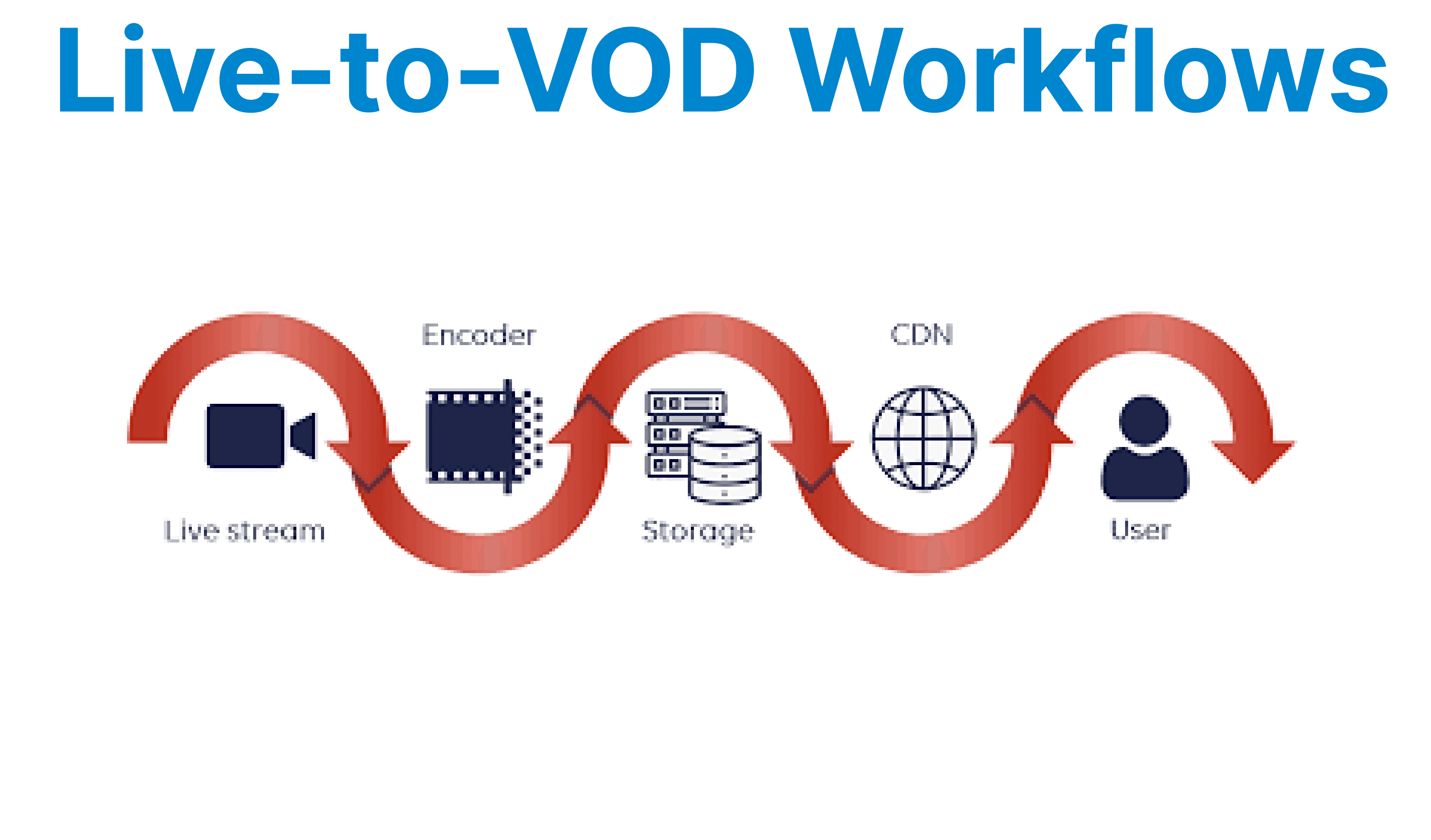
Live-to-VOD is the process of converting live broadcast content into on-demand video after the live event ends. Unlike traditional VOD, which involves pre-recorded and uploaded content, Live-to-VOD allows for the transformation of live content into accessible video once the broadcast has concluded. This process enables users to watch the content at their convenience.
How Live-to-VOD Works
Live Stream Capture
The first step in a Live-to-VOD workflow is capturing the live stream. This typically occurs via ingestion protocols such as RTMP, HLS, or DASH. The stream is captured from a broadcasting source and then transferred to a server or CDN for delivery.
Recording the Stream
As the live content is being broadcast, it is simultaneously recorded. This recorded content is essential for later converting it into a VOD asset. Recording involves segmenting the video into smaller chunks (usually between 2-10 seconds), which will be used as the building blocks for the VOD.
Transcoding and Encoding
After the live stream ends, the recorded segments are passed through a transcoding process. During this step:
- The video is encoded into multiple formats and resolutions (e.g., 240p, 480p, 720p, and 1080p) for compatibility with various devices.
- Adaptive Bitrate Encoding (ABR) may be applied to adjust video quality based on the user's available bandwidth.
File Packaging
Once the video is transcoded, it is packaged into formats compatible with VOD playback. Typically, video segments are stored in containers such as MP4, WebM, or MKV. For streaming protocols like HLS or DASH, the segments are organized into playlists or manifest files, which guide the video player in delivering the content.
Adding Metadata and Subtitles
At this point, metadata such as the video title, description, and keywords is added. If subtitles or captions are available, they are synchronized with the video during this step.
Uploading and Distribution
After transcoding and metadata addition, the VOD file is uploaded to a content storage system or CDN. This enables fast and efficient content delivery to end-users for high-quality playback.
Key Technologies in Live-to-VOD Workflows
Live Video Protocols
- RTMP (Real-Time Messaging Protocol): Commonly used for live streaming, this protocol transmits video data to media servers or CDNs.
- HLS (HTTP Live Streaming): A popular protocol for live and on-demand streaming, supported by most devices and browsers.
- DASH (Dynamic Adaptive Streaming over HTTP): A protocol similar to HLS, designed for adaptive bitrate streaming.
Media Servers
Media servers, such as Wowza, NGINX, or Adobe Media Server, play a crucial role in ingesting, segmenting, recording, and transcoding the live stream for conversion into VOD content.
Content Delivery Networks (CDNs)
Once the VOD file is prepared, it is distributed through CDNs to ensure fast, reliable playback, regardless of the user’s location.
Challenges in Live-to-VOD Workflows
Latency
Latency is a key challenge in Live-to-VOD workflows, as there is an inherent delay between the live broadcast and the conversion process. This delay is due to the time needed for recording, transcoding, and packaging the video. Minimizing this latency is important for platforms requiring near-instant VOD availability.
Scalability
Handling multiple concurrent live events and converting them to VOD requires a scalable infrastructure. The transcoding pipeline must be able to handle a high volume of live streams simultaneously without significant performance degradation.
Storage and Delivery
Storing and delivering large video files for VOD requires considerable storage capacity. Developers must ensure that content is stored efficiently and delivered quickly through CDN networks to minimize latency and avoid interruptions in playback.
Best Practices for Live-to-VOD Workflows
Efficient Video Encoding
For smooth transitions between live and VOD content to encode video into multiple resolutions and bitrates. This guarantees that users with different bandwidths can still access the content without interruptions.
Smart Buffering Strategies
Implementing intelligent buffering and pre-buffering strategies can reduce rebuffering events. By dynamically adjusting buffering based on network speed, developers can improve user experience during playback.
Real-Time Monitoring
Monitoring the entire Live-to-VOD pipeline in real time helps detect bottlenecks and performance issues. Developers should track key performance metrics (such as encoding time, buffering events, and storage utilization) for optimal performance.
Automation
Automating the transcoding, metadata insertion, and subtitle synchronization process is essential for scaling Live-to-VOD workflows. Automation tools can reduce manual intervention, improve efficiency, and minimize human error.
Device Compatibility
Ensure that the VOD content is compatible with a wide range of devices, including desktops, mobile phones, and smart TVs. The video player should be responsive, and the video format should be supported across platforms.
What’s Next?
Streamline your Live-to-VOD conversion process with Cincopa’s API for video delivery, transcoding, and distribution. Check our developer documentation to integrate advanced features and ensure efficient content management across platforms.