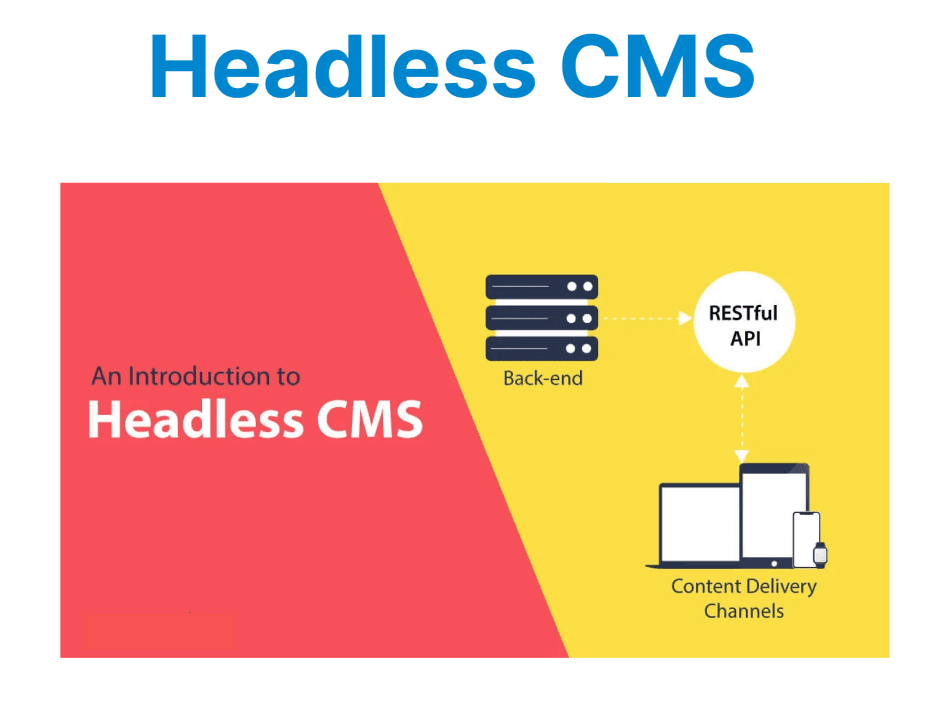
A headless CMS is a backend-only content management system that allows users to create, manage, and store content, but does not handle how that content is presented to end users. Instead of coupling content with templating engines or site layouts, it exposes content through APIs—typically REST or GraphQL—allowing developers to retrieve structured data programmatically.
Unlike traditional monolithic systems like WordPress or Joomla, which tightly integrate backend logic with frontend themes, a headless CMS separates concerns entirely. The frontend is built independently using frameworks such as React, Vue, Angular, or mobile technologies, offering full control over rendering, routing, and deployment.
Architectural Overview
Modern content systems often prioritize flexibility by separating the management layer from the presentation layer.The system does not include a frontend, leaving developers free to design and deploy custom client applications.
A headless CMS is composed of:
- A content database (typically structured as collections or models)
- An administrative UI for non-technical users
- A REST or GraphQL API layer that exposes content
It does not include any frontend delivery mechanism. Developers build and control their own frontend interfaces.
[Editor/Admin Panel] ──> [Content Database] ──> [REST/GraphQL API] ──> [Frontend: Web, Mobile, IoT]
Core Components
Typical systems are composed of key modules that handle content creation, structure, delivery, and access control. These components work together to support a decoupled workflow where content is managed independently from its presentation. The setup ensures flexibility, scalability, and consistent data handling across platforms.
Admin Interface
A web dashboard where content managers create and manage content entries. The interface typically maps to predefined schemas such as blog posts, products, or events.
API Layer
The primary mechanism for delivering content. This layer exposes structured content through REST or GraphQL. Frontend clients consume these APIs to render pages dynamically or statically.
Content Modeling
Models define the structure and validation rules for content types. For example, a blog model might require title: string, slug: string, and body: richtext.
Media Storage
Assets like images or documents are uploaded via the admin panel and stored either locally or in a cloud service. Media URLs are returned as fields in the API response.
Role-Based Access
Authentication and authorization controls restrict what users can read, edit, or publish. This ensures data integrity and supports editorial workflows.
API Usage Example
Frontend applications retrieve content from the CMS using either REST or GraphQL APIs. These examples show how structured data can be accessed and integrated into custom interfaces.
REST API Example
A typical REST endpoint returns structured content in JSON format. It allows clients to fetch content resources via standard HTTP requests.
GET /api/postsExplanation:
- Sends a GET request to the /api/posts endpoint to retrieve content.
- The server responds with a JSON array containing multiple post objects.
- Each object includes fields such as id, title, slug, and body that represent the post content.
- This data can be parsed and rendered dynamically in a frontend application.
Response:
[{"id": 12,"title": "Intro to Headless CMS","slug": "intro-to-headless-cms","body": "<p>Content body here</p>"}]Explanation:
- This JSON array contains one post object with fields like id, title, slug, and body, representing structured content returned by the CMS.
- The body field includes HTML content that can be rendered directly in the frontend using tools like dangerouslySetInnerHTML in React.
GraphQL Example
GraphQL queries enable precise data retrieval by specifying exactly which fields are needed. This reduces over-fetching and improves performance.
query {posts {title slug body}}Explanation:
- Only the specified fields (title, slug, and body) are returned for each post, making the response lightweight and optimized for frontend use.
Integration Workflow
The integration process connects content management with frontend delivery. Editors input content through the CMS, which is then accessed by frontend applications via APIs. This enables seamless rendering of dynamic content across various platforms.
- Admin creates structured content in the CMS backend.
- CMS exposes this content via REST or GraphQL APIs.
- Frontend application fetches data using fetch() or a client like Apollo or Axios.
- UI renders dynamic views based on the retrieved content.
Frontend Code Sample (React + REST)
React applications can consume CMS content by making API requests and updating component state. This example shows how to retrieve posts from a REST endpoint and render them dynamically using JSX.
Example: Fetching blog posts from a CMS and displaying them in a list
import { useEffect, useState } from "react";const App = () => {const [posts, setPosts] = useState([]);useEffect(() => {fetch("https://cms.example.com/api/posts").then((res) => res.json()).then((data) => setPosts(data));}, []);return (<div>{posts.map((post) => (<article key={post.id}><h2>{post.title}</h2><p dangerouslySetInnerHTML={{ __html: post.body }} /></article>))}</div>);};Explanation:
- Imports: useEffect and useState are React hooks used for managing side effects and component state.
- State Initialization: const [posts, setPosts] = useState([]); initializes an empty array to store the fetched posts.
- Data Fetching: The API response is converted to JSON and passed to setPosts, which updates the component state with the array of posts.
- Rendering: Inside the return statement, the component maps over the posts array. Each post is rendered inside an <article> element using its id as a unique key.
Advantages in Software Architecture
Decoupling the content layer from the presentation layer introduces several technical benefits. A headless CMS architecture supports flexibility, scalability, and efficient development workflows across modern software systems.
- Frontend Independence: The user interface and backend system are completely decoupled, allowing frontend teams to build and deploy independently without relying on CMS-specific rendering logic.
- Multi-platform Support: Content is delivered through APIs, making it reusable across websites, mobile applications, kiosks, and other digital interfaces from a single backend source.
- CI/CD Compatibility: Since content is managed separately from application code, development teams can integrate the CMS easily into continuous integration and deployment workflows without affecting content workflows.
- Scalable Delivery: API-based content can be cached through CDNs and distributed globally, enabling faster load times and reduced server load as the system scales.
Use Cases
Headless CMS platforms are suited for scenarios where content needs to be distributed across multiple channels or rendered by custom frontends. Below are common use cases where a headless CMS is particularly effective:
- Web Applications: Serve content to modern frontend frameworks like React, Vue, or Angular without relying on server-side templating.
- Mobile Applications: Provide dynamic, API-driven content to Android and iOS apps from a single backend source.
- Static Site Generators (SSGs): Integrate with tools like Next.js, Gatsby, or Hugo to pre-render content at build time for improved performance and SEO.
- Multi-language Sites: Manage and deliver localized content across different regions or audiences with structured API responses.
Common Headless CMS Options
Several platforms offer headless CMS capabilities, each with different features, hosting models, and integration methods. Below are commonly used options across various development environments:
- Strapi: Open-source and self-hosted, Strapi supports both REST and GraphQL APIs. It allows full control over content models, permissions, and custom plugin development.
- Contentful: A SaaS-based CMS offering structured content management, powerful localization support, and a user-friendly editor. Widely used for enterprise and multi-channel delivery.
- Sanity: Real-time collaboration, structured content, and customizable content models using a schema-based approach. Uses GROQ, a flexible query language for content delivery.
- Ghost (Headless Mode): Primarily designed for publishing and blogs, Ghost can be used as a headless CMS via its REST API. Ideal for lightweight content-driven applications.
Comparison with Traditional CMS
| Feature | Traditional CMS (e.g., WordPress) | Headless CMS (e.g., Strapi, Contentful) |
| Rendering Engine | Included | Not included |
| Frontend Control | Limited | Full control |
| Content Access | HTML | JSON / GraphQL |
| Multi-platform Delivery | Complex | Native capability |
| Hosting Requirements | Tightly coupled | Decoupled and flexible |