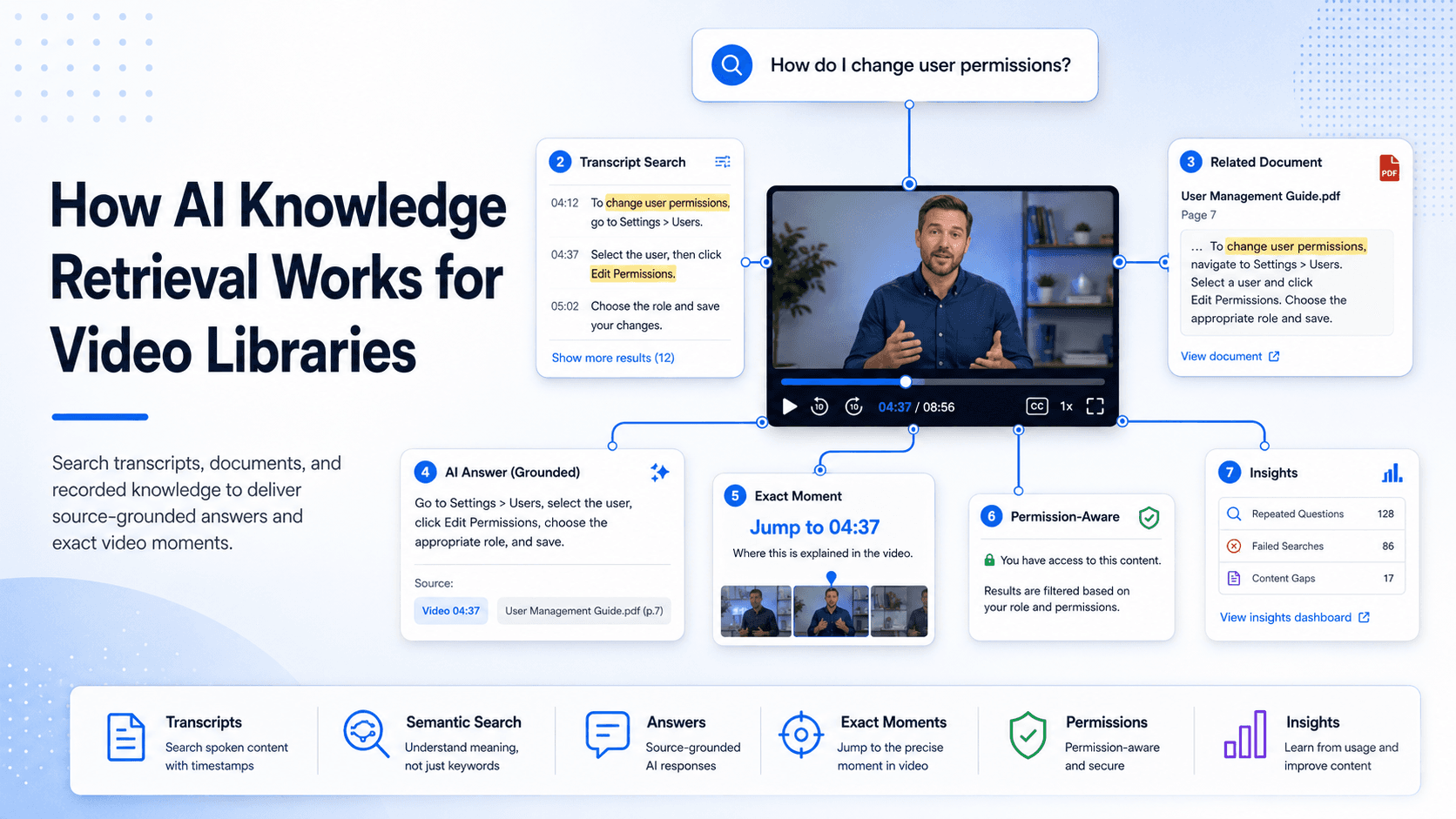
Video libraries often contain useful knowledge, but finding a specific answer can be difficult.
A training session may cover several topics. A webinar may contain one important explanation inside a long recording. A support video may show the exact fix a user needs, but the title may not match the question being asked.
AI knowledge retrieval helps make this content easier to find.
Instead of searching only video titles, folders, and tags, it uses transcripts, metadata, and related documents to identify relevant information inside the library.
What Is AI Knowledge Retrieval?
AI knowledge retrieval allows users to ask questions across a collection of videos and documents.
The system searches the available content, identifies the most relevant information, and presents an answer based on those sources.
For example, a user may ask: How do I change user permissions?
The relevant explanation may be inside a video titled “Advanced Administrator Training.”
A traditional search system may miss it because the title does not contain the same wording. AI retrieval can use the video transcript to understand that the recording includes the answer.
The user can then receive a short response and move to the relevant moment in the video.
Why Traditional Video Search Is Limited
Most video search systems depend on titles, descriptions, categories, and tags.
These elements are useful, but they do not describe everything discussed inside a recording.
A single video may cover account setup, permissions, reporting, integrations, and troubleshooting. Unless each topic is added manually to the metadata, some information may remain difficult to find.
AI retrieval uses the spoken content itself.
This allows users to search by meaning rather than exact wording.
A user may search for “give a manager access to reports,” while the video uses the phrase “assign the reporting role.” A semantic search system can recognize that both refer to the same task.
The Role of Transcripts
Transcripts make spoken video content searchable.
They allow the platform to identify questions, explanations, process steps, product names, and technical terms within a recording.
Transcript quality directly affects retrieval quality. Errors in product names, acronyms, or technical language can lead to weak search results.
For important content, organizations should review automated transcripts and correct key terms.
Captions often use the same transcript and also improve accessibility.
Search Across Videos and Documents
Knowledge rarely exists in video alone.
A training recording may be supported by a PDF. A product demonstration may reference release notes. A troubleshooting video may need a technical guide.
AI retrieval is more useful when it can search across these sources together.
The video can show how a process works, while the document provides exact instructions, specifications, or reference material.
This gives users a more complete answer without forcing them to search several systems separately.
Natural-Language Questions
Users do not always know the official name of a feature or process.
They may describe the outcome they want or the problem they are experiencing.
Examples include:
- How do I reset a locked account?
- Where can I update billing access?
- What should I do when the integration fails?
- How do I add a new team member?
- What is the approval process?
Natural-language retrieval allows users to ask these questions directly.
The platform compares the meaning of the question with the available content and returns the most relevant answer.
Source-Grounded Answers
AI answers should be based on approved organizational content.
This is often called source-grounded retrieval.
The system should not simply generate a general response. It should use the information found in the video library and related documents.
Users should also be able to verify the answer.
A reliable platform should show the source and, for video, connect the user to the relevant moment in the recording.
If the library does not contain enough information, the system should avoid presenting an unsupported answer.
Exact-Moment Navigation
One of the main benefits of AI retrieval for video is the ability to link users directly to the relevant section.
Instead of opening a 45-minute recording and searching manually, the user can move to the point where the answer is explained or demonstrated.
This is especially useful for:
- Product walkthroughs
- Technical training
- Troubleshooting videos
- Recorded webinars
- Internal process guides
- Meeting recordings
Exact-moment links also help users understand the context around an answer and verify the original explanation.
Permissions and Security
AI retrieval must respect the same access rules as the original content.
A user should not receive an answer from a private video or document they are not authorized to view.
The platform may need to consider:
- User roles
- Group membership
- Workspace access
- Public or private status
- Domain restrictions
- Single sign-on permissions
Search results, generated answers, and source links should all follow these controls.
This is particularly important for internal knowledge, customer training, partner content, and regulated information.
Insights From User Questions
AI retrieval can also help content teams understand what users need.
Organizations can review repeated questions, weak answers, failed searches, and topics with no useful result.
This provides a clearer view of where the library needs improvement.
For example, a repeated question with no reliable answer may indicate that the team should:
- Update an existing video
- Add a supporting document
- Correct a transcript
- Improve metadata
- Record a new explanation
This turns user questions into a practical content roadmap.
Common Uses
Product Education
Users can ask questions about features, workflows, settings, and product updates.
The system can retrieve information from walkthroughs, training videos, and supporting documents.
Customer Training
Learners can complete structured training and later return to the library for quick answers without repeating an entire course.
Support and Troubleshooting
Users can describe a problem and reach the part of a video that shows the solution.
This can improve self-service and reduce repetitive support requests.
Internal Knowledge
Employees can retrieve information from meetings, workshops, release briefings, and internal training recordings.
Workflow Documentation
Teams can search process videos for specific steps in software, finance, operations, and internal systems.
Partner Enablement
Partners can access approved product, compliance, and technical knowledge without depending on repeated help from internal teams.
Tools and Platforms for AI Video Retrieval
AI retrieval for video requires more than basic video hosting.
A suitable platform should support accurate transcription, semantic search, source-grounded answers, document retrieval, exact-moment links, permissions, and question analytics.
Cincopa is one example of a platform that supports this model. It combines video hosting with Galleries, hosted Pages, Tube environments, and VideoGPT for asking questions across videos and documents.
Users can receive answers based on the available library and move to the relevant video moment. Teams can also review recurring questions, weak answers, and missing-content signals.
This type of platform is useful when an organization already has valuable knowledge in recordings and wants to make it searchable without converting every video into an article.
Final Thoughts
AI knowledge retrieval makes video libraries easier to search and use.
It allows users to ask questions across videos and documents, receive answers based on approved content, and move directly to the relevant source.
Its value is not only faster search.
It also helps organizations understand what users are asking, where the library is weak, and what knowledge should be improved next.