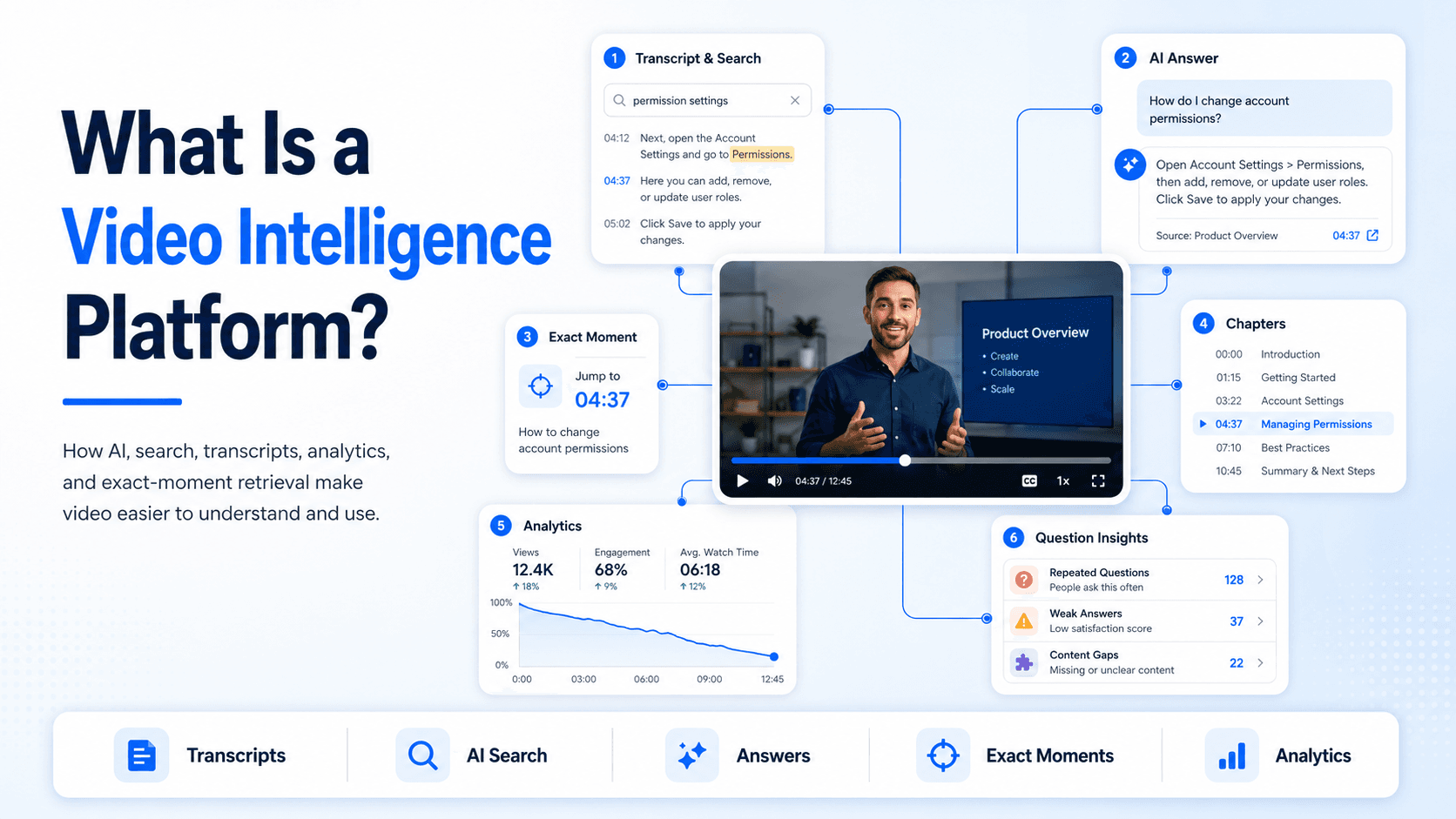
Organizations create large amounts of video for training, support, product education, internal communication, and customer onboarding.
The challenge is that video is difficult to search and analyze at scale. Important information may be buried inside long recordings, while teams often know little about what users are watching, asking, or failing to find.
A video intelligence platform helps solve this problem by making video content easier to understand, search, analyze, and use.
What Does a Video Intelligence Platform Do?
A video intelligence platform applies AI, search, metadata, analytics, and automation to video content.
It can help organizations:
- Generate transcripts and captions
- Identify topics and keywords
- Create chapters and summaries
- Search spoken content
- Answer questions from videos
- Link users to relevant moments
- Analyze viewing behavior
- Identify repeated questions
- Detect missing or weak content
The goal is not only to store and play video. It is to make the information inside the video accessible and measurable.
How It Differs From Video Hosting
Video hosting platforms focus mainly on uploading, storing, streaming, embedding, and protecting video.
These capabilities remain important, but they do not always make the knowledge inside the video easy to retrieve.
A video intelligence platform adds a layer of understanding.
For example, a user may search for “How do I change account permissions?” even when the relevant video is called “Advanced Administrator Training.”
The platform can use the transcript and metadata to identify the correct section and direct the user to the relevant moment.
Core Capabilities
Transcription and Captions
Transcripts convert spoken content into searchable text.
This allows users to find terms, questions, process steps, names, and technical explanations that appear inside a recording.
Captions also improve accessibility and make video easier to use in different environments.
AI-Powered Search
Traditional video search often relies on titles, descriptions, and tags.
Video intelligence platforms can search the transcript itself, helping users find information even when it is not included in the video title.
This is particularly useful for webinars, meetings, training sessions, and long product demonstrations.
Natural-Language Question Answering
Some platforms allow users to ask questions in their own words.
Instead of opening several videos, a user can ask: How do I reset a locked account?
The platform can provide a response based on the available video and document content and connect the answer to the original source.
Exact-Moment Navigation
A useful answer should link back to the place where it came from.
Exact-moment navigation allows users to jump directly to the relevant section of a recording rather than scanning the full timeline.
This is especially useful for technical training, support, and process-based content.
Viewer Analytics
A video intelligence platform can show how people interact with content.
Common metrics include views, watch time, completion, drop-off points, and viewer activity.
These insights help teams understand which videos are useful and where users lose interest.
Question and Content-Gap Insights
More advanced platforms also analyze what users are asking.
Teams may be able to identify:
- Repeated questions
- Searches with no useful result
- Weak answers
- Topics that create confusion
- Missing training or support content
This helps turn user behavior into a practical content roadmap.
Common Use Cases
Product Education
Product teams can make feature walkthroughs, onboarding videos, release updates, and supporting documents easier to search.
Users can ask a question and reach the relevant demonstration without watching an entire training session.
Customer Training
Organizations can build searchable training libraries for customers, partners, and employees.
Learners can complete structured content while also retrieving quick answers later.
Support and Troubleshooting
Support videos can be connected to help centers and technical documentation.
Users can search for a problem, receive a direct answer, and jump to the visual step that demonstrates the solution.
Internal Knowledge
Recorded meetings, webinars, workshops, and release briefings often contain useful information that becomes difficult to retrieve later.
Video intelligence makes this content easier to search and reuse across teams.
Workflow Documentation
Screen recordings and process demonstrations can be turned into searchable guides for internal systems, standard operating procedures, and recurring tasks.
Video Intelligence Platforms and Video Knowledge Platforms
The terms are closely related but not always identical.
A video intelligence platform focuses on understanding and analyzing video through AI, metadata, search, and analytics.
A video knowledge platform usually combines those capabilities with structured delivery, access controls, document support, and knowledge environments such as galleries, pages, or portals.
In practice, many modern platforms include elements of both.
Cincopa is one example. It combines video hosting with Galleries, hosted Pages, Tube environments, and VideoGPT for asking questions across videos and documents. It also helps teams review repeated questions, weak answers, and missing-content signals.
This type of platform is useful when organizations want to move beyond video storage and turn existing recordings into searchable knowledge.
Final Thoughts
A video intelligence platform makes video content easier to search, understand, analyze, and improve.
It adds intelligence to the video library through transcripts, metadata, question answering, exact-moment navigation, and usage insights.
The value is not only in knowing what videos exist. It is in helping users reach the right information and helping teams understand what knowledge is still missing.