Organizations are producing more video than ever.
Training sessions, product walkthroughs, internal meetings, customer webinars, support demonstrations, process recordings, and onboarding videos all contain useful knowledge.
The problem is that most of this knowledge remains difficult to use.
A recording may exist, but users may not know where to find it. They may find the right video but not the exact section they need. Related documents may live somewhere else. Important information may be buried inside a long timeline with no clear way to retrieve it.
Structured video knowledge is designed to solve this problem.
It turns video from a collection of files into an organized, searchable, and usable knowledge resource.
What Does Structured Video Knowledge Mean?
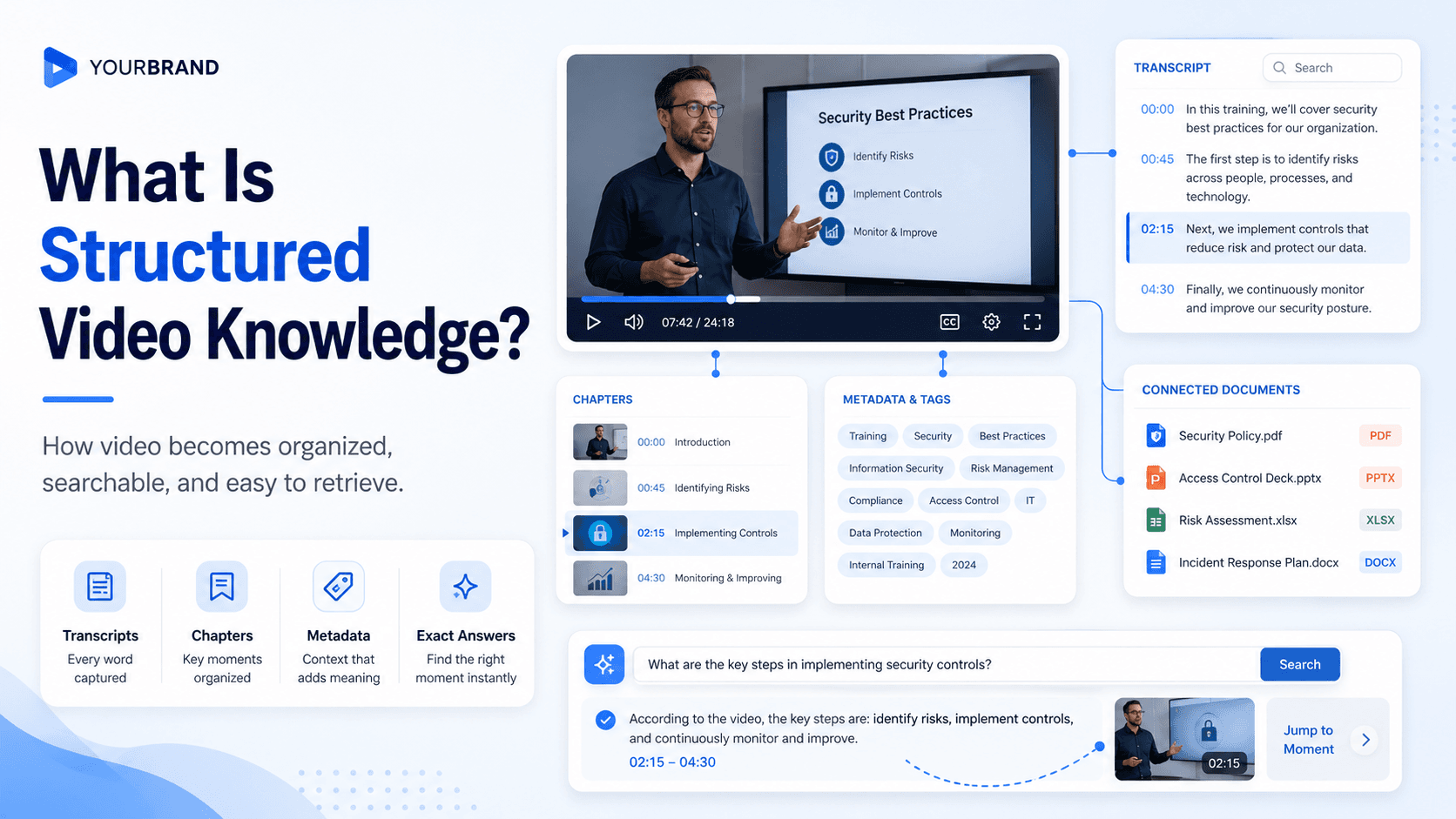
Structured video knowledge is video-based information that has been organized, enriched, connected, and prepared for retrieval.
The structure may include:
- Clear titles and descriptions
- Categories and topics
- Playlists or galleries
- Transcripts and captions
- Chapters and timestamps
- Metadata and tags
- Related documents
- Access permissions
- Search across spoken content
- AI-powered question answering
- Links to exact moments in a recording
The goal is not simply to make a video library look organized.
The goal is to help people reach the right information with less effort.
A basic video collection stores content.
A structured video knowledge system helps users understand what the content covers, where it belongs, who it is for, and how to retrieve a specific answer from it.
Why Video Knowledge Needs Structure
Video is useful because it can show processes, demonstrate products, explain complex ideas, and preserve expertise.
It is also difficult to search.
A document can be scanned quickly. Headings and paragraphs make it easier to understand where information appears.
A video is linear. Users usually need to move through a timeline to find the relevant section.
Without structure, a video library often creates several problems.
Users depend on filenames
A user may need an answer about changing permissions, but the relevant video may be titled “Administrator Training Session 3.”
Unless the user already knows what the recording contains, the title provides little help.
Long videos contain many different topics
A webinar or meeting recording may cover several subjects.
The title usually reflects only the main theme. Smaller but useful explanations remain hidden inside the recording.
Related knowledge becomes disconnected
A video may explain a process while a PDF contains the checklist, a help article includes technical details, and a slide deck shows the workflow.
When these resources are stored separately, users must search multiple systems to understand one topic.
Libraries become harder to manage as they grow
A folder system may work for a small collection.
As the number of videos increases, users may struggle to understand where content belongs. Similar videos may appear in different places, categories may overlap, and older information may remain mixed with current guidance.
Structure helps reduce this confusion.
The Difference Between Organized Video and Structured Video Knowledge
An organized video library and a structured video knowledge system are related, but they are not the same.
An organized video library may include:
- Folders
- Playlists
- Categories
- Thumbnails
- Descriptions
This makes browsing easier.
Structured video knowledge goes further.
It makes the information inside the videos available for search, retrieval, and reuse.
For example, a structured system may allow a user to ask: How do I give a team member access to reports?
The system can identify the relevant explanation inside a longer training recording, provide a direct response, and send the user to the moment where the process is demonstrated.
The value comes from making the knowledge inside the video usable, not only organizing the video file.
The Main Elements of Structured Video Knowledge
Structured video knowledge is created through several connected layers.
1. Clear Titles and Descriptions
Titles help users understand the main purpose of a video.
A title such as “Training Session 5” provides little context.
A title such as “How to Configure Roles and User Permissions” tells the user what problem the video addresses.
Descriptions add more detail.
A useful description can explain:
- What the video covers
- Who should watch it
- Which questions it answers
- Which product or process it relates to
- Whether supporting documents are available
- What the user should be able to do afterward
Clear titles and descriptions support both browsing and search.
2. Categories and Content Grouping
Videos should be grouped according to how users think about the information.
Possible groupings include:
- Product
- Feature
- Department
- Audience
- Role
- Workflow
- Training course
- Support issue
- Skill level
- Content type
For example, a customer training library might include:
- Getting Started
- Account Administration
- Core Workflows
- Reporting
- Integrations
- Troubleshooting
Categories create a visible structure and help users narrow their search.
However, the structure should remain simple enough to understand and maintain.
3. Transcripts and Captions
Transcripts turn spoken information into searchable text.
This is one of the most important steps in creating structured video knowledge.
Without a transcript, search systems usually depend on the title, description, and tags.
With a transcript, users can search for words and phrases spoken anywhere in the recording.
This makes it possible to find:
- Process steps
- Technical terms
- Product names
- Error messages
- Policies
- Questions
- Explanations
- Names and dates
Captions also improve accessibility and make videos easier to use without sound.
Transcript quality matters. Important product names, acronyms, and technical terms should be reviewed for accuracy.
4. Chapters and Timestamps
Chapters divide a long recording into smaller sections.
For example, a product training video might include:
- Introduction
- Account Setup
- User Management
- Reporting
- Common Errors
- Questions and Answers
Chapters help users understand the scope of the recording before watching it.
They also allow users to move directly to the relevant topic instead of scanning the full timeline.
Timestamps become especially valuable for webinars, workshops, meetings, product demonstrations, and long training sessions.
5. Metadata and Tags
Metadata provides additional context that may not appear clearly in the video itself.
Useful metadata may include:
- Product
- Topic
- Department
- Speaker
- Audience
- Region
- Language
- Content type
- Date
- Version
- Access level
- Skill level
Metadata helps search systems classify the content and allows users to filter large libraries.
It should be consistent.
For example, using “Customer Education,” “Client Training,” and “Customer Learning” as separate tags may create unnecessary duplication unless they represent different concepts.
A small, controlled set of metadata fields is often more useful than a large and inconsistent tagging system.
6. Related Documents and Supporting Material
Knowledge rarely exists in only one format.
A video may demonstrate a process, while a PDF provides the checklist. A webinar may have a slide deck. A troubleshooting recording may reference a technical guide.
Structured video knowledge connects these resources.
Related materials may include:
- PDFs
- Checklists
- Manuals
- Slides
- Templates
- Release notes
- Worksheets
- Help articles
- Standard operating procedures
Bringing related content together helps users understand the topic without searching across several disconnected systems.
7. Search Across Spoken Content
Traditional video search often looks only at titles, descriptions, and tags.
Structured video knowledge makes the transcript searchable as well.
This allows users to search for the information they need, even when the exact phrase does not appear in the title.
For example, a recording titled “Advanced Reporting Workshop” may include an explanation of how to export data for a specific department.
A user searching for “How do I export department reports?” should still be able to find it.
Search across spoken content makes the knowledge inside the recording visible.
8. Natural-Language Question Answering
Search is becoming more conversational.
Users may not want to compare a list of video results. They may want to ask a direct question.
Examples include:
- How do I reset a locked account?
- Where can I update billing permissions?
- What should I do when the integration fails?
- How do I add a new employee?
- What is the approval process?
A structured video knowledge system can compare these questions with the available transcripts, metadata, and supporting documents.
It can then provide a response based on the source material and guide the user to the relevant content.
This is especially useful when the library contains long recordings or several videos covering related topics.
9. Exact-Moment Navigation
A direct answer is useful, but users may still need to see the original explanation.
Structured video knowledge should connect an answer or search result to the exact moment in the recording where the subject is discussed.
This allows users to:
- Verify the information
- See the process visually
- Understand the surrounding context
- Skip unrelated sections
- Share the relevant moment with someone else
Exact-moment navigation is particularly important for technical processes, product demonstrations, and troubleshooting content.
10. Access and Permissions
Structure also includes governance.
Not every video should be available to every user.
An organization may have:
- Public product videos
- Gated customer training
- Partner-only resources
- Private employee knowledge
- Department-specific process recordings
- Restricted compliance content
Access controls may include:
- Password protection
- User accounts
- Role-based permissions
- User groups
- Domain restrictions
- Single sign-on
- Private workspaces
- Expiring links
Search results should respect these permissions.
A user should only be able to discover content they are authorized to view.
11. Analytics and Knowledge-Gap Insights
Structured video knowledge should help teams understand how the library is being used.
Traditional analytics may show:
- Views
- Watch time
- Completion rates
- Viewer activity
Knowledge-focused analytics can also show:
- Common searches
- Repeated questions
- Questions with weak answers
- Searches with no result
- Topics users struggle with
- Content users abandon
- Missing information
These insights help teams improve the structure and content of the library.
For example, repeated questions about a topic with no strong answer may indicate that a new video is needed.
A high number of failed searches may show that a title, transcript, or category needs improvement.
Structured Video Knowledge Compared With Unstructured Video
The difference becomes clearer when the two approaches are compared.
Unstructured video
- Stored in folders or drives
- Limited titles and descriptions
- No reliable transcript
- No chapters
- Little or inconsistent metadata
- Documents stored elsewhere
- Search based mainly on filenames
- Users manually scan the timeline
- No clear insight into missing information
Structured video knowledge
- Organized by topic, audience, or workflow
- Clear titles and descriptions
- Searchable transcripts and captions
- Chapters and timestamps
- Consistent metadata
- Related documents connected
- Search across spoken content
- Natural-language question answering
- Direct links to relevant moments
- Analytics for repeated questions and content gaps
The second approach makes the library more useful without requiring users to understand how it was originally stored.
Common Uses of Structured Video Knowledge
Structured video knowledge can support several different business functions.
Product Education
Product teams can organize:
- Onboarding videos
- Feature walkthroughs
- Workflow demonstrations
- Release updates
- Product documentation
- Frequently asked questions
Users can search the library by task or question and reach the relevant explanation.
This content may be embedded inside product pages, help centers, documentation, or customer portals.
Training and Onboarding
Training teams can structure videos by:
- Course
- Topic
- Role
- Skill level
- Learning path
- Department
Learners can browse the program while also searching across the spoken content.
This makes the library useful both for complete training and quick reference.
Support and Troubleshooting
Support teams can connect troubleshooting videos with help articles, manuals, and technical documentation.
A user can ask a question, receive a direct response, and move to the moment where the fix is shown.
This can improve self-service and reduce repetitive support requests.
Internal Knowledge Hubs
Recorded meetings, workshops, release briefings, and internal training often contain useful information that becomes difficult to retrieve later.
A structured internal hub can organize these recordings by team, project, topic, or workflow.
Employees can search past explanations without relying on the person who originally delivered them.
Workflow Documentation
Process recordings can be structured into reusable guides for:
- Software procedures
- Finance workflows
- Support operations
- Employee onboarding
- Standard operating procedures
- Internal systems training
The video shows how the process works, while chapters, transcripts, and supporting documents make the knowledge easier to revisit.
Partner Enablement
Organizations can structure knowledge for external partners such as:
- Distributors
- Installers
- Contractors
- Lenders
- Resellers
- Service providers
Partners can access the information they need while permissions keep restricted material protected.
Tools and Platforms for Structured Video Knowledge
Structured video knowledge usually requires more than general cloud storage.
Organizations may need a platform that supports:
- Video hosting and delivery
- Automated transcripts and captions
- Metadata and categorization
- Galleries, pages, or portals
- Video and document management
- Search across spoken content
- AI-powered question answering
- Exact-moment navigation
- Access controls
- Viewer analytics
- Question and search insights
- Content-gap identification
Cincopa is one example of a platform designed around this approach.
It combines its video hosting foundation with Galleries, hosted Pages, and Tube environments for organizing and distributing video and document knowledge.
Its VideoGPT capability allows users to ask questions across a structured library, receive responses grounded in the available content, and move to the relevant moment in a video.
Teams can also review repeated questions, weak answers, and missing-content signals to understand what should be updated or created next.
The right platform depends on the size of the library, the audience, the required level of security, and where the knowledge needs to be delivered.