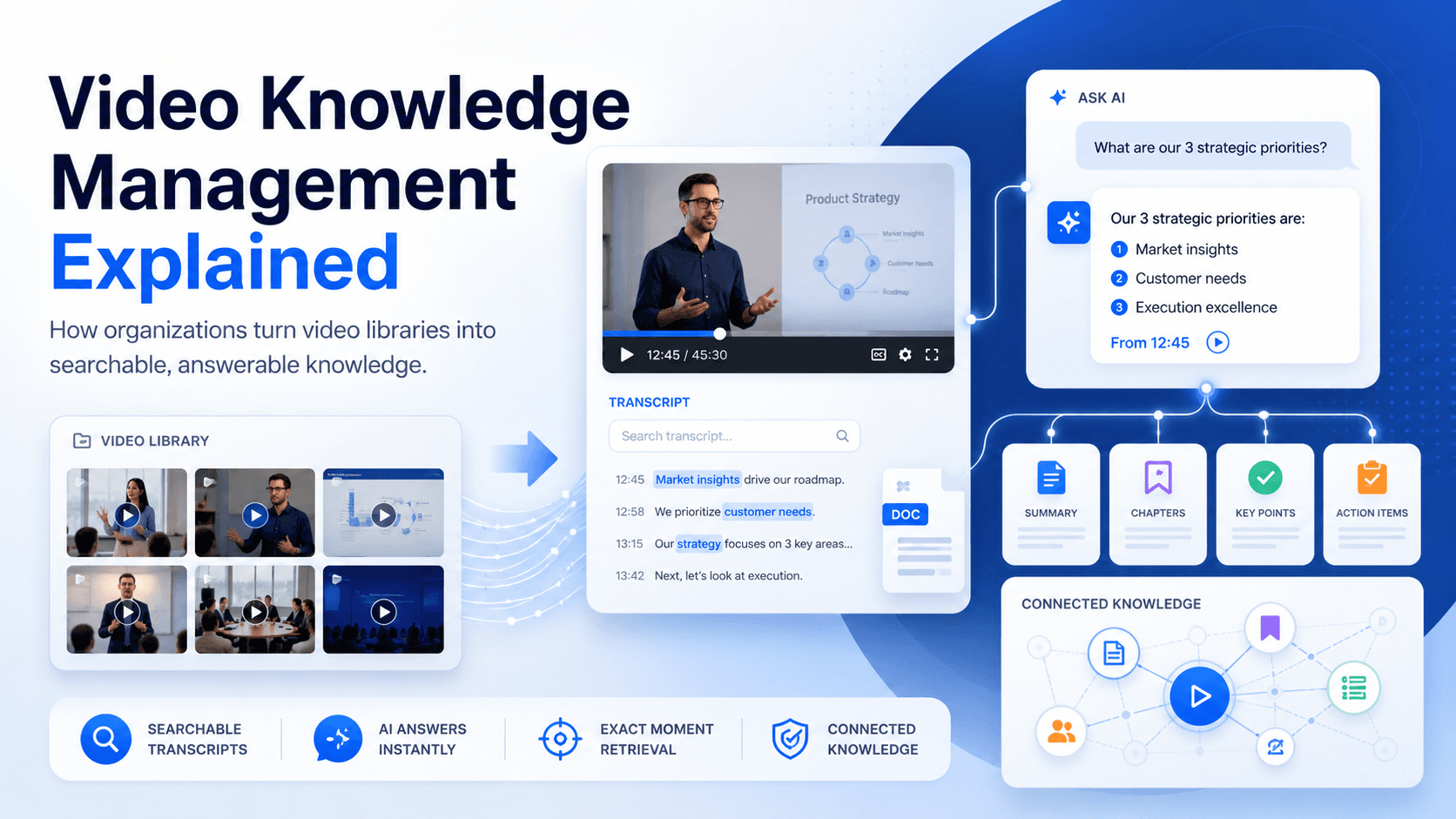
Organizations are creating more video than ever.
Training sessions are recorded. Product teams publish walkthroughs. Support specialists demonstrate fixes. Internal meetings capture decisions and operational knowledge. Subject-matter experts explain processes through webinars, screen recordings, and live demonstrations.
Yet much of this knowledge becomes difficult to use after the video is published.
A useful explanation may be buried 28 minutes into a training recording. A product workflow may exist inside an old webinar. A troubleshooting step may be shown clearly in a support video, but users still contact the support team because they cannot find it.
This is the problem video knowledge management is designed to solve.
Video knowledge management is the process of organizing, distributing, finding, governing, and improving the knowledge stored inside videos. Its purpose is not simply to store recordings. It is to make the information inside them accessible when employees, customers, partners, or learners need an answer.
What Is Video Knowledge Management?
Video knowledge management applies knowledge management practices to video-based information.
It covers the complete lifecycle of video knowledge, including:
- Capturing expertise through recordings
- Organizing videos into meaningful collections
- Adding captions, transcripts, metadata, and supporting documents
- Controlling who can access the content
- Making spoken information searchable
- Helping users find specific answers inside long recordings
- Tracking how people use the content
- Identifying missing or unclear information
- Updating the library based on real questions
A basic video library usually focuses on files. Users see titles, thumbnails, folders, playlists, and categories.
A video knowledge system focuses on answers.
Instead of requiring users to decide which video they should watch, the system helps them reach the relevant explanation, process, or source more directly.
Why Traditional Video Libraries Often Fail
The challenge usually begins as the library grows.
When an organization has 20 videos, browsing may be manageable. When it has hundreds of training sessions, product demonstrations, webinars, technical guides, and internal recordings, titles and folders are no longer enough.
Several problems begin to appear.
Knowledge becomes buried inside long recordings
Search tools can usually identify a video by its title or description. However, the answer a user needs may only appear briefly inside a much longer recording.
A 45-minute training session might contain a useful two-minute explanation. Unless the user already knows where it appears, finding it requires manually scanning the timeline.
This creates friction. Users may abandon the search, ask a colleague, contact support, or repeat work that has already been explained.
Different content formats become disconnected
Organizational knowledge rarely exists in video alone.
A training video may have an attached PDF. A support walkthrough may reference a technical document. A webinar may include slides, release notes, checklists, or related guides.
When videos and supporting documents live in separate systems, users have to search multiple locations to understand one topic.
A more complete knowledge environment brings these formats together so users can move between the explanation, supporting document, and source material without starting a new search.
People repeat questions that have already been answered
Support, training, and enablement teams often answer the same questions repeatedly, even when relevant content already exists.
The problem is not always a lack of content. It is often a lack of access.
Users may know that the answer exists somewhere, but they do not know which recording contains it, what the video is called, or where the relevant explanation begins.
The result is duplicated effort for both the person asking and the person answering.
Libraries grow without a clear improvement process
Many teams decide what to create next based on assumptions.
They publish more tutorials, record more webinars, and expand their libraries without knowing which questions users still cannot answer.
As a result, content volume increases while knowledge access remains difficult.
A useful video knowledge management process should show teams not only what content is being watched, but also where users remain confused and what information is still missing.
The Difference Between Video Hosting and Video Knowledge Management
Video hosting provides the technical foundation for uploading, storing, streaming, embedding, and protecting video.
These functions remain important. Organizations still need dependable playback, captions, secure delivery, access controls, branded players, and analytics.
Video knowledge management builds on that foundation.
It adds the structure and intelligence required to turn a collection of recordings into an accessible knowledge environment.
A video hosting platform may help an organization publish a training recording.
A video knowledge management platform should also help the organization:
- Place the recording in the right knowledge collection
- Connect it with related documents
- Make the spoken content searchable
- Answer questions using information from the recording
- Send users to the relevant moment
- Track what users are asking
- Reveal where answers are missing or insufficient
The distinction is important because playing a video is not the same as making its knowledge usable.
The Core Components of Video Knowledge Management
A practical video knowledge management strategy usually includes several connected capabilities.
1. Centralized video and document management
Knowledge should be managed through a consistent environment rather than scattered across personal drives, meeting platforms, learning systems, website pages, and unconnected storage tools.
Centralization does not necessarily mean every user must visit one portal.
The same managed library may be distributed across websites, help centers, learning platforms, customer portals, internal systems, and product pages.
The important point is that the underlying content can be governed, updated, and measured consistently.
2. Structured knowledge delivery
A flat list of recordings becomes difficult to navigate quickly.
Videos should be grouped according to how people look for information. Depending on the use case, this may include:
- Product
- Feature
- Department
- Role
- Training course
- Support issue
- Customer journey stage
- Workflow
- Audience
- Skill level
Different knowledge needs may also require different delivery formats.
A company might use embedded galleries for support documentation, hosted pages for a focused training program, and a private portal for internal knowledge.
The delivery method should match the audience and the problem being solved.
3. Transcripts, captions, and metadata
Spoken information must become machine-readable before it can be searched effectively.
Transcripts and captions make the content inside videos available for indexing and retrieval. Metadata adds context such as topic, speaker, product, department, language, or content type.
These elements also improve accessibility and make large libraries easier to classify.
Without accurate transcripts and metadata, valuable video knowledge can remain invisible to search systems.
4. Search inside video content
Traditional search often depends heavily on filenames, tags, and descriptions.
Video knowledge search should also examine what was actually said inside the recording.
For example, a user may search for “How do I reset the device after installation?” even when no video has that exact title.
The system should be able to identify where the topic is explained within the content rather than limiting results to videos with matching filenames.
5. Question answering across the library
AI is changing video discovery from keyword search to direct question answering.
Instead of opening several videos and searching through each one, users can ask a natural-language question across a collection.
The system can then provide an answer grounded in the available content and connect the response to the relevant source.
This is especially valuable for training, product education, onboarding, support, and internal operational knowledge, where users usually need one specific answer rather than an entire recording.
6. Exact-moment navigation
A useful answer should not separate the user from its source.
When possible, users should be able to move from the answer to the exact moment in the video where the subject is demonstrated or explained.
This allows them to verify the response, understand the surrounding context, and see visual steps that may be difficult to communicate through text alone.
For technical or process-based knowledge, the visual explanation is often as important as the written answer.
7. Access control and governance
Not every video knowledge environment should be public.
Internal training, process documentation, customer education, partner enablement, and regulated information may require different access levels.
A video knowledge management system may therefore need:
- Private or gated access
- User groups
- Role-based permissions
- Single sign-on
- Domain restrictions
- Secure sharing
- Workspace-level control
- Viewer tracking
Governance becomes more important as video moves from marketing content into operational knowledge.
8. Analytics and knowledge-gap discovery
Basic analytics answer questions such as how many people watched a video or how long they viewed it.
Knowledge analytics should go further.
Teams should also be able to understand:
- What users are asking
- Which questions appear repeatedly
- Which answers receive negative feedback
- Where users fail to find information
- Which topics produce the most confusion
- What new content may be needed
This creates a feedback loop between content usage and content creation.
Instead of guessing what to record next, teams can use actual user demand to guide their content roadmap.
A Better Model: Publish First, Improve From Real Questions
Traditional knowledge management projects often begin with a large planning effort.
Teams define a taxonomy, prepare documentation standards, write articles, organize a portal, migrate old material, and only then release the knowledge base.
This structure can be valuable, but it may also delay access to knowledge that already exists.
A more practical approach is to begin with existing materials.
An organization can publish its current training videos, webinars, support walkthroughs, internal recordings, and supporting documents. Users can begin asking questions and searching the library. The team can then observe where the system provides strong answers and where knowledge is missing.
The process becomes:
Publish existing knowledge → observe real questions → identify gaps → improve the library
Structure remains important, but it becomes part of the improvement process rather than a prerequisite for getting started.
This approach also reduces the risk of spending months creating content that does not match what users actually need.
Common Video Knowledge Management Use Cases
Video knowledge management can support several business functions.
Product education
Product teams can organize onboarding videos, feature walkthroughs, workflow demonstrations, release updates, and supporting documentation.
Users can access this knowledge directly from product pages, documentation, customer portals, or learning environments.
Instead of searching through multiple tutorials, they can ask a specific question and reach the explanation that addresses their task.
Customer and employee training
Training teams can build structured video libraries for onboarding, professional development, certification, or customer education.
Learners can browse content by course, role, or topic while also asking specific questions across the training collection.
This can complement an existing learning management system or provide a lighter alternative when a full LMS rollout is unnecessary.
Support and troubleshooting
Technical videos can be embedded inside help centers and support documentation.
Instead of manually scanning long tutorials, users and technicians can ask a question, receive a direct response, and jump to the visual step that demonstrates the solution.
This can improve self-service and reduce the number of repetitive questions reaching support teams.
Internal knowledge retention
Meetings, workshops, release briefings, webinars, and internal training sessions often contain valuable information that becomes difficult to retrieve later.
A controlled video knowledge hub can preserve this material and make it searchable across teams.
Employees can return to past explanations without relying on the person who originally delivered them.
Workflow and process documentation
Screen recordings and demonstrations can show how internal processes are completed.
This is useful for software procedures, operational workflows, finance processes, standard operating procedures, and system training where visual sequencing matters.
Video can often communicate these processes more clearly than long written instructions.
Partner enablement
Organizations can distribute product, compliance, technical, and operational knowledge to distributors, installers, contractors, lenders, or other external partners.
Access can be controlled while still giving partners a searchable self-service resource.
This allows teams to support external audiences without repeatedly delivering the same live explanation.
Tools and Platforms for Video Knowledge Management
Video knowledge management requires more than a place to upload and play recordings.
Organizations need tools that can help them organize content, control access, search spoken information, connect videos with supporting documents, and understand how people use the knowledge library.
A video knowledge management platform may include capabilities such as:
- Secure video hosting and delivery
- Branded players and website embeds
- Structured galleries, pages, or portals
- Automated captions and transcripts
- Search across spoken video content
- AI-powered question answering
- Direct links to relevant moments within a video
- Access controls and viewer analytics
- Insights into repeated questions and missing content
Cincopa is one platform that supports this approach.
It combines its video hosting foundation with Galleries, hosted Pages, and Tube environments for organizing and distributing video knowledge.
Its VideoGPT capability allows users to ask questions across videos and documents, receive responses based on the available content, and move to the relevant moment in a video.
Teams can also review question patterns, weak answers, and content-gap signals to understand which resources should be improved or created next.
These capabilities reflect how video platforms are evolving.
Storage, bandwidth, and playback remain important, but organizations are also evaluating whether a platform can help people find, understand, and apply the knowledge contained inside a growing video library.
The Future of Video Knowledge
For years, organizations treated video primarily as content to publish.
That model is changing.
Video is becoming a major source of organizational knowledge. It contains demonstrations, explanations, decisions, processes, expertise, and context that may not exist anywhere else.
However, that value remains limited when users must remember a title, locate the correct recording, and manually search through its timeline.
Video knowledge management addresses this gap by making recordings structured, searchable, answerable, governed, and measurable.
The organizations that benefit most will not necessarily be those that create the largest number of videos.
They will be the ones that make the knowledge inside their existing videos easier to reach, verify, apply, and improve.