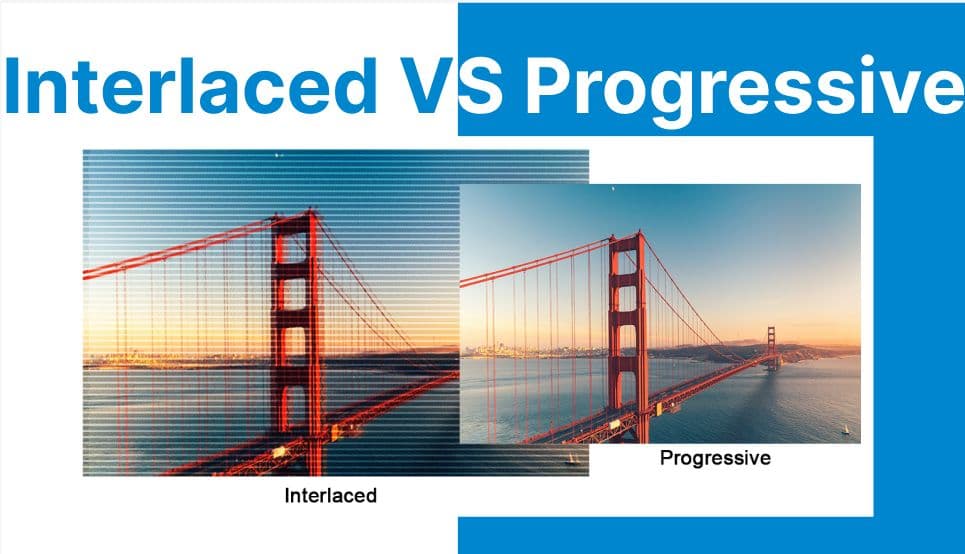
Interlaced and progressive scanning define the two fundamentally different methods of video frame construction. These formats govern how image data is rasterized, transmitted, and displayed, directly influencing compression efficiency, playback smoothness, motion accuracy, and hardware requirements. Understanding these modes is essential for developers working on video encoding, streaming infrastructure, or playback engines.
Frame Construction: Line Rasterization and Timing
Interlaced Video
Interlaced video encodes each full frame as two sequential fields, each comprising half the vertical resolution: Field 1 contains odd-numbered lines, and Field 2 contains even-numbered lines. These fields are sampled at different time intervals and transmitted alternately.
For instance, in 1080i60, the display renders 60 fields per second (30 field pairs), resulting in an effective frame rate of 30fps with a temporal resolution of 60 updates per second.
During encoding, interlaced frames are treated as two temporally offset 1920×540 segments, requiring separation and timing control in the frame buffer pipeline. This field-based rasterization is optimized for analog CRT displays, where phosphor decay allows the persistence of alternating fields to simulate smooth motion.
Progressive Video
Progressive video encodes and transmits each frame as a complete top-to-bottom raster. Unlike interlaced video, there are no alternating temporal fields; each frame is sampled at a single time point and represents the full spatial resolution.
A 1080p60 stream, for example, it consists of 60 full 1920×1080 frames rendered per second. The frame buffer holds and delivers each bitmap atomically, enabling lossless spatial continuity and eliminating the need for deinterlacing or field merging during playback or processing.

Motion Representation & Temporal Artifacts
Interlaced Video
Interlaced content suffers from temporal incoherency due to the offset capture times of the two fields. Fast-moving subjects will exhibit combing artifacts — a visual tearing effect caused by the spatial displacement between fields. This artifact becomes pronounced during rapid horizontal motion or camera pans.
To resolve these inconsistencies, deinterlacing algorithms (e.g., bob, weave, motion-compensated interpolation) must reconstruct full frames from temporally misaligned fields. These algorithms vary in complexity and effectiveness and introduce additional computational overhead.
Progressive Video
In contrast, progressive video offers frame-level temporal consistency. Each frame corresponds precisely to a moment in time, with no intra-frame motion shift. This makes progressive video ideal for motion estimation, object tracking, and frame-accurate editing. Because there are no fields to reconcile, there is no need for post-processing reconstruction or motion interpolation.
Frame Rate Semantics & Display Synchronization
Interlaced Video
In interlaced formats like 1080i60, the system renders 60 fields per second, but since each field only represents half a frame, the effective frame rate is 30 fps. Displays must alternate between fields every 1/60th of a second to recreate the full image.
In PAL systems (50i), this results in 25 effective frames per second. These formats require conversion or real-time deinterlacing for flat-panel displays, which natively expect full frames.
Progressive Video
Progressive video provides a 1:1 timing correlation between content and display refresh. For example, 1080p60 maps cleanly to a 60Hz panel, with one frame rendered for each display refresh cycle.
This alignment simplifies timestamp calculations in playback engines and ensures jitter-free subtitle and audio synchronization. Progressive content also scales well to higher refresh rates (e.g., 120Hz, VRR) with clean frame pacing.
Compression, Bitrate, and Codec Behavior
Interlaced Video
Interlaced video, by halving vertical resolution per field, offers lower instantaneous data per field. However, compression is less efficient due to the requirement for field-based motion vectors and prediction blocks. Block-based codecs such as MPEG-2 and H.264 must treat each field independently in motion estimation, which introduces redundancy and increases encoding complexity.
Additionally, interlaced content presents challenges for GOP compression. B-frames and P-frames must operate on sub-field prediction domains, reducing spatial redundancy exploitation. Encoding efficiency drops further when interlaced content is improperly flagged or misinterpreted as progressive during transcoding.
Progressive Video
Progressive video enables more efficient intra- and inter-frame compression. With no field boundaries, codecs can perform motion prediction across entire frame blocks.
Techniques such as CABAC, CAVLC, and SAO (in HEVC) achieve better compression ratios for the same perceptual quality. The progressive scan also integrates seamlessly with scalable coding extensions (e.g., SVC) and ABR streaming protocols (e.g., HLS, DASH), making it preferable for internet delivery.
Application Contexts
Interlaced Video
Interlaced scanning was designed for analog CRT displays, leveraging phosphor decay and raster scan behavior to simulate continuous motion with limited bandwidth. It remains in use for broadcast TV, interlaced DVDs, and legacy camcorder formats and is relevant when digitizing archival analog sources.
Progressive Video
Progressive scanning has become the default format for modern digital video production and delivery. It is universally adopted in Blu-ray discs, streaming platforms (Netflix, YouTube), gaming consoles, real-time rendering engines, and surveillance systems.
In post-production, progressive content simplifies keyframe alignment, color grading, compositing, and VFX work — all of which rely on consistent per-frame timing.
Hardware & Display Pipeline Implications
Interlaced Video
Interlaced formats are natively supported by CRT displays, which interpret alternating fields as temporal motion through their raster scan process. In contrast, modern displays (LCD, OLED, QLED) operate on progressive rasterization and must deinterlace interlaced content before rendering. This deinterlacing can be done in hardware (via GPUs or video processors) or software (via shaders or decode filters), often introducing latency and visual artifacts.
Progressive Video
Progressive content is natively compatible with all modern hardware. GPUs use double- or triple-buffered VSync, adaptive refresh, and frame pacing to ensure frame-accurate rendering without jitter or tearing. There is no need for field reconstruction, timing correction, or interpolation, reducing both software complexity and power consumption during playback.
Comparison
| Feature | Interlaced | Progressive |
| Frame Construction | Two fields per frame | One full frame per refresh |
| Motion Artifacts | Combing, temporal aliasing | Smooth motion, no combing |
| Frame Rate Interpretation | 60i = 30fps effective | 60p = 60fps true |
| Codec Complexity | Field-based motion vectors | Frame-based motion prediction |
| Streaming Efficiency | Lower bitrate, more deinterlacing | Higher bitrate, simpler delivery |
| Display Compatibility | Requires deinterlacing | Plug-and-play on modern displays |
| Ideal Use Case | Legacy broadcast, archival video | Modern digital media, real-time rendering |
What's Next?
Working with interlaced and progressive formats in your video pipeline? Use Cincopa’s API to detect, deinterlace, and transcode interlaced video into progressive streams optimized for modern playback environments.
Check our developer documentation to build workflows that ensure compatibility, efficiency, and visual clarity across all display types.
[cincopa A4HAcLOLOO68!A8ADMQ9GZqBo]