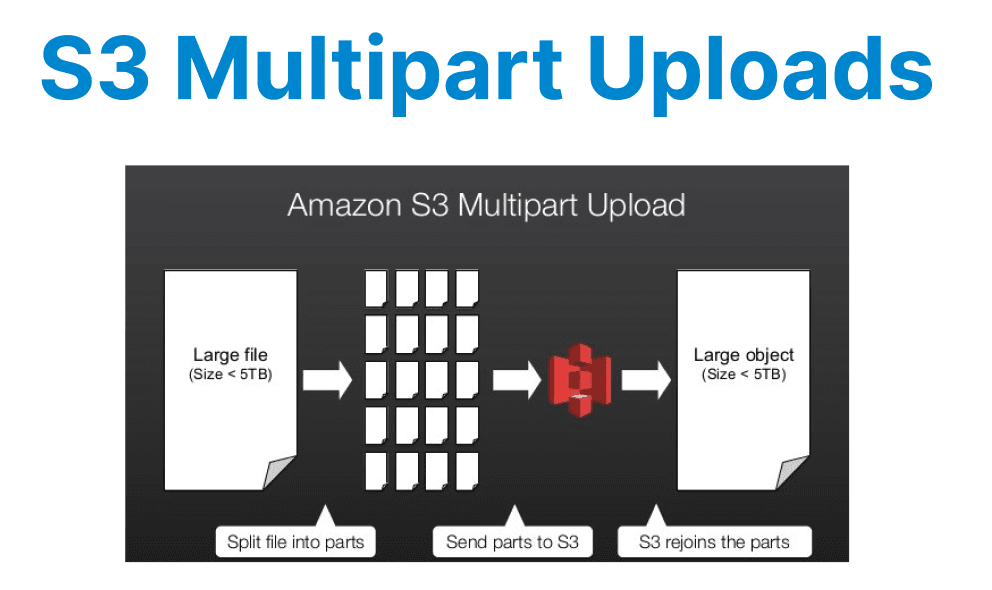
Amazon S3 Multipart Upload is a mechanism designed to handle large file uploads efficiently by breaking them into smaller, manageable parts. This approach is particularly beneficial for video files, which often range from hundreds of megabytes to several gigabytes. Multipart Uploads improve upload reliability, reduce network overhead, and enable parallel transfers, making them ideal for developers working with large media assets.
Technical Overview of Multipart Uploads
Multipart Upload splits a single large object into multiple parts, each uploaded independently. The minimum part size is 5 MiB, except for the last part, which can be smaller. The maximum part count is 10,000, and the maximum object size supported is 5 TiB. Each part is assigned an ETag (entity tag) upon successful upload, which must be provided during the final assembly of the object. The process involves three main steps:
- Initialization: A Multipart Upload session is initiated via the CreateMultipartUpload API call, returning an UploadId.
- Part Uploads: Individual parts are uploaded using UploadPart, each requiring the UploadId, part number, and data chunk.
- Completion: The upload is finalized using CompleteMultipartUpload, where all part ETags and numbers are submitted to S3 for reassembly.
If an upload fails midway, AbortMultipartUpload cleans up unused parts to avoid storage charges.
Advantages Over Single-Part Uploads
Multipart Uploads offer several technical benefits for large video files:
- Improved Throughput: Parts can be uploaded in parallel, maximizing bandwidth utilization. This is critical when dealing with high-resolution video files where sequential uploads would introduce significant latency.
- Resumable Transfers: Failed uploads do not require restarting from scratch. Only the affected parts need re-uploading, reducing wasted bandwidth and time.
- Lower Memory Footprint: Since parts are processed individually, client applications do not need to load the entire file into memory, making it feasible for memory-constrained environments.
- Optimized Retry Logic: Network issues or timeouts impact only individual parts rather than the entire transfer, simplifying error handling.

Implementing Multipart Uploads in Code
Below is an example of implementing a Multipart Upload in Python using AWS SDK Boto3. This enables efficient uploading of large video files by splitting them into parts:
import boto3
from boto3.s3.transfer import TransferConfig

s3_client = boto3.client('s3')
bucket_name = 'your-bucket'
file_path = 'large_video.mp4'
object_key = 'videos/large_video.mp4'

# Configure multipart thresholds (5 MiB part size)
config = TransferConfig(multipart_threshold=5 * 1024 * 1024, multipart_chunksize=5 * 1024 * 1024)

# Initiate multipart upload
response = s3_client.create_multipart_upload(Bucket=bucket_name, Key=object_key)
upload_id = response['UploadId']

# Upload parts
parts = []
with open(file_path, 'rb') as file:
part_number = 1
while True:
chunk = file.read(5 * 1024 * 1024) # 5 MiB chunk
if not chunk:
break
response = s3_client.upload_part(
Bucket=bucket_name,
Key=object_key,
PartNumber=part_number,
UploadId=upload_id,
Body=chunk
)
parts.append({'PartNumber': part_number, 'ETag': response['ETag']})
part_number += 1

# Complete the upload
s3_client.complete_multipart_upload(
Bucket=bucket_name,
Key=object_key,
UploadId=upload_id,
MultipartUpload={'Parts': parts}
)
Leveraging Parallel Uploads for Maximum Throughput
While the basic multipart upload process works sequentially, parallelizing part uploads can drastically reduce transfer times for large video files. Below are two approaches to achieve this:
Threaded Uploads with Boto3
The concurrent.futures.ThreadPoolExecutor enables concurrent execution of upload_part calls. File chunks are distributed across threads, reducing the overall upload time.
- Each thread handles one part at a time.
- Threads execute independently, and results are collated for finalization.
import concurrent.futures

def upload_part_wrapper(args):
part_number, chunk = args
response = s3_client.upload_part(
Bucket=bucket_name,
Key=object_key,
PartNumber=part_number,
UploadId=upload_id,
Body=chunk
)
return {'PartNumber': part_number, 'ETag': response['ETag']}

# Split file into chunks and upload in parallel
with open(file_path, 'rb') as file:
chunks = [(i, file.read(5 * 1024 * 1024)) for i in range(1, 10000) if file.read(5 * 1024 * 1024)]
with concurrent.futures.ThreadPoolExecutor(max_workers=10) as executor:
parts = list(executor.map(upload_part_wrapper, chunks))
Explanation:
- This method splits the video file into chunks and uploads them concurrently using Python’s ThreadPoolExecutor.
- By using multiple threads, the overall upload time is significantly reduced.
Boto3’s Built-in High-Level API
Using upload_file with TransferConfig simplifies the process by managing thread pools and multipart thresholds internally.
from boto3.s3.transfer import TransferConfig

config = TransferConfig(
multipart_threshold=5 * 1024 * 1024,
multipart_chunksize=5 * 1024 * 1024,
max_concurrency=10 # Enable parallel uploads
)

s3_client.upload_file(
file_path,
bucket_name,
object_key,
Config=config
)
Explanation:
- max_concurrency=10 allows for parallel uploads, handling multiple parts at once.
- The upload_file method simplifies the multipart upload by automatically managing parallelism when TransferConfig is properly set.
Best Practices for Developers
- Optimal Part Sizes: AWS recommends part sizes between 5 MiB and 5 GiB for most workloads. Smaller parts increase overhead, while larger parts reduce parallelism. Benchmarking upload speeds for different chunk sizes is advisable.
- Parallel Uploads: Utilize multi-threading or asynchronous programming to upload parts concurrently. The AWS SDK’s high-level upload_file method automatically handles parallelism when TransferConfig is properly configured.
- Error Handling: Implement retries with exponential backoff for transient failures. Track uploaded parts to avoid redundant transfers.
- Server-Side Encryption: For secure video storage, enable SSE-KMS or SSE-S3 by specifying encryption parameters in CreateMultipartUpload.
- Monitoring: Use CloudWatch metrics (S3BytesUploaded, S3UploadParts) to track upload performance and identify bottlenecks.
Performance Considerations
Network conditions, part size, and concurrency settings significantly impact upload speeds. Testing under real-world conditions helps fine-tune parameters. For instance, increasing part sizes beyond 50 MiB may improve throughput in high-latency networks, whereas low-latency environments benefit from higher concurrency with smaller parts.
Cost Implications
Multipart Uploads incur costs for each UploadPart and CompleteMultipartUpload request. While minimal, these can add up for high-frequency uploads. Additionally, incomplete multipart uploads accumulate storage charges until explicitly aborted or lifecycle policies clean them up.
Comparison with Alternative Approaches
While S3 Transfer Acceleration and AWS Snowball are alternatives for large data transfers, Multipart Upload remains the most cost-effective and scalable solution for programmatic video uploads over the internet. It integrates seamlessly with serverless architectures (e.g., Lambda-triggered processing) and supports presigned URLs for secure client-side uploads.
By leveraging Multipart Uploads, developers can ensure efficient, resilient, and scalable handling of large video files in S3, optimizing both performance and cost.