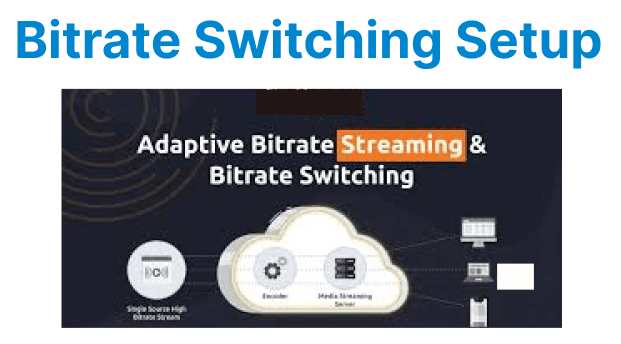
Video quality selection, or bitrate switching, is a feature of adaptive streaming protocols like HLS and DASH. This functionality allows the video player to dynamically adjust the quality of the video stream based on the viewer's network conditions, providing a seamless viewing experience with minimal buffering. Implementing bitrate switching requires understanding the streaming protocols, player configuration, and the methods to handle dynamic switching.
Key Components of Bitrate Switching
1. Adaptive Bitrate Streaming (ABR)
Adaptive Bitrate Streaming is a technique used to adjust the video quality in real-time based on the viewer's available bandwidth and device capabilities. It encodes the same video content at multiple bitrates and segments it into small chunks. The player can then select the appropriate chunk to download, ensuring smooth playback even in fluctuating network conditions.
The major protocols supporting ABR are:
- HLS (HTTP Live Streaming): Uses M3U8 playlists to provide multiple quality levels.
- DASH (Dynamic Adaptive Streaming over HTTP): Uses MPD (Media Presentation Description) manifests for dynamic quality switching.
2. Video Quality Representation
Each video quality is typically represented by different bitrate streams, each corresponding to a different resolution (e.g., 360p, 720p, 1080p). The streaming player selects the stream with the appropriate bitrate based on the user’s current network speed.
- Bitrate: The amount of data transferred per second during playback, influencing video resolution and quality.
- Resolution: The display quality of the video (e.g., 480p, 720p, 1080p).
When network conditions improve or degrade, the player will switch between these quality levels without interrupting playback.
Implementing Bitrate Switching in Video Players
HLS (HTTP Live Streaming) Implementation
HLS is one of the most common protocols that support adaptive bitrate streaming. It works by providing a master playlist file (M3U8), which contains references to different quality levels of the video stream. The video player uses this playlist to fetch the video segments at the appropriate quality based on current network conditions.
Example: Setting Up HLS in HTML5 Video Player
<video id="videoPlayer" controls>
<source src="https://your-server.com/video/playlist.m3u8" type="application/x-mpegURL">
</video>
Explanation:
- The <source> tag points to the M3U8 playlist file, which contains references to different video qualities.
- The player automatically switches between video qualities depending on the bandwidth.
DASH (Dynamic Adaptive Streaming over HTTP) Implementation
DASH uses MPD (Media Presentation Description) files to define available bitrates and the segments for each quality. The player dynamically switches between the bitrates as the network conditions change, providing a smooth viewing experience.
Example: Setting Up DASH in HTML5 Video Player
<video id="videoPlayer" controls>
<source src="https://your-server.com/video/manifest.mpd" type="application/dash+xml">
</video>
Explanation:
- The src points to the MPD manifest file, which contains the bitrate and segment details.
- The player handles bitrate switching automatically by selecting the appropriate representation based on network speed.
Handling Bitrate Switching in JavaScript with HLS.js
HLS.js is a JavaScript library that enables the playback of HLS streams in browsers that do not natively support HLS (e.g., Chrome, Firefox). HLS.js automatically selects the best bitrate based on the current bandwidth.
Example: Using HLS.js for Bitrate Switching
<video id="video" controls></video>

<script src="https://cdn.jsdelivr.net/npm/hls.js@latest"></script>
<script>
var video = document.getElementById('video');
var videoSrc = 'https://your-server.com/video/playlist.m3u8';

if (Hls.isSupported()) {
var hls = new Hls();
hls.loadSource(videoSrc);
hls.attachMedia(video);

hls.on(Hls.Events.MANIFEST_PARSED, function () {
console.log('Manifest parsed');
});

hls.on(Hls.Events.LEVEL_SWITCHED, function (event, data) {
console.log('Switched to level', data.level);
});
} else {
console.error('HLS.js is not supported in this browser');
}
</script>
Explanation:
- HLS.js is used to load and play the HLS stream when the browser does not support native HLS playback.
- The LEVEL_SWITCHED event provides insights into when the bitrate (level) has changed.
Handling Bitrate Switching in JavaScript with Dash.js
Dash.js is a JavaScript library that provides support for playing DASH streams in browsers. It automatically handles bitrate switching by monitoring network conditions and adjusting video quality dynamically.
Example: Using Dash.js for Bitrate Switching
<video id="videoPlayer" controls></video>

<script src="https://cdn.dashjs.org/latest/dash.all.min.js"></script>
<script>
var videoPlayer = document.getElementById('videoPlayer');
var url = "https://your-server.com/video/manifest.mpd";

// Initialize Dash.js player
var player = dashjs.MediaPlayer().create();
player.initialize(videoPlayer, url, true);

// Listen for streaming started event
player.on(dashjs.MediaPlayer.events.STREAMING_STARTED, function () {
console.log('Streaming started');
});

// Listen for quality change events
player.on(dashjs.MediaPlayer.events.QUALITY_CHANGE_REQUESTED, function (e) {
console.log('Requested quality change to', e.newQuality, 'for type', e.mediaType);
});

player.on(dashjs.MediaPlayer.events.QUALITY_CHANGE_RENDERED, function (e) {
console.log('Quality change rendered to', e.newQuality, 'for type', e.mediaType);
});

// Optional: Manual quality selection (e.g., set to 720p)
// player.setQualityFor('video', 2); // Index 2 corresponds to a specific quality level

// Optional: Restrict auto-switching (set to false to allow user control)
// player.updateSettings({ streaming: { abr: { autoSwitchBitrate: { video: true } } } });
</script>
Explanation:
- STREAMING_STARTED confirms playback has begun.
- QUALITY_CHANGE_REQUESTED logs when the player requests a new quality level based on network conditions.
- QUALITY_CHANGE_RENDERED confirms when the new quality is actually rendered on screen.
- ABR Control: The autoSwitchBitrate setting can be adjusted to enable or disable automatic bitrate switching.
Performance Optimization for Bitrate Switching
Segment Duration Optimization
Reducing the segment duration can improve bitrate switching responsiveness. Shorter segments result in faster switching as the player has more frequent opportunities to adjust the bitrate.
Example: Configuring Segment Duration in HLS
ffmpeg -i input.mp4 -c:v libx264 -hls_time 2 -hls_flags delete_segments -f hls output.m3u8Explanation:
- -hls_time 2: Sets segment duration to 2 seconds, allowing for faster bitrate switching.
- -hls_flags delete_segments: Removes old segments quickly to optimize storage and playback speed.
Buffer Management for Smooth Transitions in Dash.js
Efficient buffer management is crucial for preventing playback interruptions and ensuring seamless quality transitions. Dash.js allows you to fine-tune buffer settings using the updateSettings method.
Example: Configuring Buffer Settings in Dash.js
// Configure buffer settings for Dash.js
player.updateSettings({
streaming: {
buffer: {
// Amount of video (in seconds) to buffer when playing at the highest quality
bufferTimeAtTopQuality: 20,
// Buffer size for long-form content (e.g., movies, long videos)
bufferTimeAtTopQualityLongForm: 30,
// Default buffer size when not at top quality
bufferTimeDefault: 10,
// How much backward buffer (already played content) to keep
bufferToKeep: 5,
// Duration threshold (in seconds) to consider content as long-form
longFormContentDurationThreshold: 300
}
}
});
Explanation:
- bufferTimeAtTopQuality: Buffer size (in seconds) when playing at the highest quality, for stable playback.
- bufferTimeAtTopQualityLongForm: Larger buffer for long-form content to minimize interruptions.
- bufferTimeDefault: Buffer size when not at the highest quality.
- bufferToKeep: Amount of already-played content to keep in the buffer (backward buffer).
- longFormContentDurationThreshold: Duration in seconds above which content is treated as long-form, triggering the larger buffer setting13.