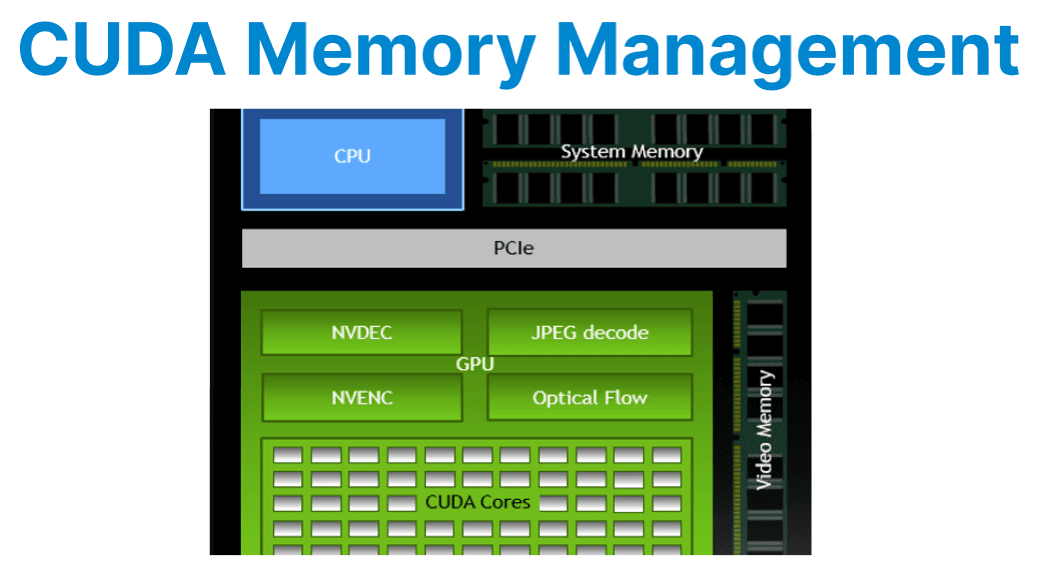
Efficient management of CUDA memory is a fundamental requirement in video applications where large frame buffers, high memory bandwidth, and low latency are critical factors. The performance of CUDA-based video pipelines depends heavily on how memory is allocated, accessed, and transferred between the host and GPU.
This includes leveraging pinned host memory for faster transfers, using zero-copy buffering to minimize overhead, and organizing processing tasks across multiple CUDA streams to maximize concurrency. Proper cleanup and synchronization further ensure stability and resource efficiency in demanding real-time video workloads.
Types of CUDA Memory
Global Memory
Global memory is the primary memory space accessible by all threads on the GPU. It is large in capacity but has high access latency compared to other memory types. In video applications, global memory is typically used for storing full-resolution frames, inference input/output tensors, and batch buffers. Efficient access patterns (e.g., coalesced reads/writes) are important for maximizing throughput.
Pinned (Page-Locked) Host Memory
Pinned, or page-locked, host memory is allocated on the CPU and locked so it cannot be paged out by the operating system. This enables direct memory access (DMA) transfers between host and device, significantly improving host-to-device (H2D) and device-to-host (D2H) transfer speeds.
Pinned memory is required for asynchronous CUDA memory copies (e.g., cudaMemcpyAsync) and is critical for real-time video streaming and low-latency applications. However, excessive use of pinned memory can reduce overall system performance, as it limits available pageable memory for the OS.
Unified Memory
Unified memory provides a single address space shared between the CPU and the GPU. It simplifies programming by automatically migrating data between the host and the device as needed. However, for high-throughput video workloads, unified memory can introduce unpredictable latency due to page migration and may significantly reduce frame rates and increase GPU utilization. It is generally not recommended for performance-critical video pipelines.
Device Memory
Device memory is allocated directly on the GPU using cudaMalloc. All CUDA kernels and most DeepStream plugins operate on device memory for maximum efficiency. Device memory is used for intermediate frame buffers, inference tensors, and results. Proper management is crucial to avoid fragmentation and leaks, especially in long-running or multi-stream applications.

Frame Buffer Allocation Strategy
Static Allocation
Static allocation involves pre-allocating memory buffers for the maximum expected batch size and frame resolution at application startup. This avoids runtime cudaMalloc calls, which are expensive and can cause fragmentation or latency spikes. For example, Pre-allocate memory buffers for the expected maximum batch size and resolution. Avoids runtime cudaMalloc calls.
cudaMalloc(&frame_buffer, width * height * channels);Explanation:
- For NV12 or P010, ensure 1.5 or 2 bytes per pixel, respectively.
- For multiple frames, allocate a pool indexed by frame count or stream ID.
Memory Reuse and Buffer Pooling
Frequent allocation and deallocation of device buffers inside processing loops can lead to fragmentation and performance degradation. Instead, allocate a fixed pool of frame buffers at startup and reuse them across frames. For example:
Allocation
std::vector<uint8_t*> frame_pool;
for (int i = 0; i < max_frames; ++i) {
uint8_t* d_buf;
cudaMalloc(&d_buf, frame_size);
frame_pool.push_back(d_buf);
}Explanation:
- Track usage via flags or circular indexing.
- Prevents GPU heap fragmentation and allocation overhead.
Zero-Copy Buffering
Zero-copy allows CUDA kernels to access host memory directly without explicit host-to-device copies. This is achieved by mapping pinned host memory into the device address space or by using EGL images for interoperability between CUDA and other APIs (such as OpenGL or video decoders)
cudaHostAlloc(&host_buf, size, cudaHostAllocMapped);
cudaHostGetDevicePointer(&dev_ptr, host_buf, 0);Explanation:
- host_buf is page-locked system RAM.
- dev_ptr is a device-accessible alias to the same memory.
- Suitable for use cases like live camera ingest or direct socket capture into GPU-accessible memory.
- Bandwidth is lower than device memory, but it eliminates copy overhead.
Copying Data to/from GPU
Efficient data transfer between the host and the device is crucial in video applications. Use cudaMemcpy2D() or cudaMemcpy2DAsync() to move frame data, as these functions handle pitch (row alignment) and allow for asynchronous operation
Synchronous Copy
Synchronous copies block the CPU thread until the entire transfer is complete. These copies occur in the default stream and ensure that all previously issued CUDA work (on all streams) is completed before and after the copy.
cudaMemcpy2D(d_frame, pitch, h_frame, width, width, height, cudaMemcpyHostToDevice);Explanation:
- Use for simple or one-off transfers.
- Requires all previous GPU work to be completed before and after the copy.
Asynchronous Copy
Asynchronous copies allow memory transfers to proceed in parallel with kernel execution, provided they occur on different CUDA streams. This is critical for maximizing throughput in pipelined video processing, where decoding, filtering, and encoding happen simultaneously.
cudaMemcpy2DAsync(d_frame, pitch, h_frame, width, width, height, cudaMemcpyHostToDevice, stream);Explanation:
- Use asynchronous copies to overlap data transfer and computation.
- Ensure that h_frame is allocated with cudaHostAlloc() or cudaHostRegister() for async transfer compatibility.
Using Page-Locked (Pinned) Host Memory
Pinned memory ensures that the host buffer is not paged out and enables DMA transfers to/from the GPU.
Allocation Example
uint8_t* h_pinned;cudaHostAlloc(&h_pinned, buffer_size, cudaHostAllocDefault);Explanation:
- cudaHostAllocDefault: Allocates memory for both synchronous and asynchronous access.
- Other flags include cudaHostAllocMapped for zero-copy and cudaHostAllocWriteCombined for write-optimized memory.
Stream-Optimized Frame Processing
To achieve full pipeline throughput, allocate multiple buffers and process them using separate CUDA streams.
Example:
cudaStream_t stream1, stream2;
cudaStreamCreate(&stream1);
cudaStreamCreate(&stream2);

// Decode in stream1
cudaMemcpyAsync(d_input, h_input, size, cudaMemcpyHostToDevice, stream1);

// Process in stream2
my_kernel<<<grid, block, 0, stream2>>>(d_input, d_output);Explanation:
- Synchronize streams only at critical points (e.g., encoder handoff).
- Assign one stream per stage (decode, process, encode) to decouple frame operations.
Memory Cleanup
At application shutdown, it is essential to free all allocated resources to prevent memory leaks and ensure a clean exit.
cudaFree(d_frame);
cudaFreeHost(h_pinned);
cudaHostUnregister(h_buf);
cudaStreamDestroy(stream1);Explanation:
- Always synchronize streams before freeing associated memory.
- For buffer pools, deallocate each cudaMalloc pointer in the pool vector.
- Use cudaDeviceReset() at application exit to release all remaining allocations (for debug/test only).