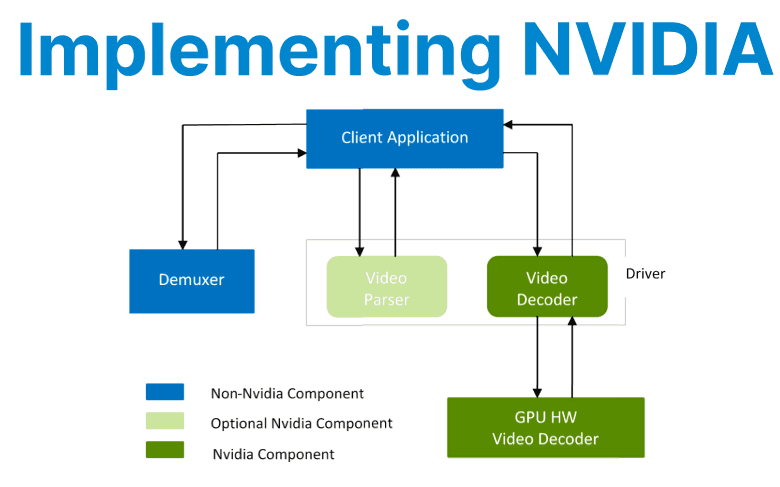
The NVIDIA Video Codec SDK provides direct access to hardware-accelerated video encoding and decoding capabilities (NVENC and NVDEC) available on NVIDIA GPUs. This SDK is essential for building low-latency, high-throughput streaming workflows without relying on CPU-based codecs. It enables developers to directly integrate NVENC/NVDEC into custom C/C++ video pipelines with full control over bitrate, buffer management, and latency optimization.
NVENC Workflow Overview
The encoder pipeline using NVENC typically follows these steps:
- Session Creation: A new encoding session is initialized using the NvEncoder interface (or the NvEncoderCuda subclass for CUDA-based memory inputs).
- Input Handling: Uncompressed video frames must be prepared in GPU memory in NV12, P010, or YUV444 formats. Frames are passed to the encoder one at a time.
- Encoding Operation: Each call to EncodeFrame() produces a compressed bitstream. The encoded packets are retrieved as byte vectors and can be written to sockets, files, or passed to muxers.
- Flush and Cleanup: After all frames have been submitted, the encoder must be flushed using EndEncode() to drain the internal buffers.
This model supports real-time streaming and batch encoding.

Encoder Initialization
Encoder initialization requires configuring both NV_ENC_INITIALIZE_PARAMS and NV_ENC_CONFIG structures, which define codec settings, rate control, GOP structure, and other operational parameters.
NvEncoderCuda* encoder = new NvEncoderCuda(cudaCtx, width, height, NV_ENC_BUFFER_FORMAT_NV12);

NV_ENC_INITIALIZE_PARAMS initParams = { NV_ENC_INITIALIZE_PARAMS_VER };
NV_ENC_CONFIG encConfig = { NV_ENC_CONFIG_VER };

initParams.encodeGUID = NV_ENC_CODEC_H264_GUID;
initParams.presetGUID = NV_ENC_PRESET_LOW_LATENCY_DEFAULT_GUID;
initParams.encodeWidth = width;
initParams.encodeHeight = height;
initParams.frameRateNum = 30;
initParams.frameRateDen = 1;
initParams.enablePTD = 1;

encoder->CreateEncoder(&initParams);
The NV_ENC_INITIALIZE_PARAMS must include:
- Codec GUID (NV_ENC_CODEC_H264_GUID or H265_GUID)
- Preset GUID for latency/quality tradeoffs (NV_ENC_PRESET_LOW_LATENCY_DEFAULT_GUID)
- Resolution, frame rate, buffer format
- Pointer to an NV_ENC_CONFIG structure for rate control and GOP config
The call to CreateEncoder() internally allocates frame buffers and registers them with NVENC.
Encoding Frames
Once initialized, raw video frames stored in device memory are copied to the encoder’s input surfaces. The encoding function compresses each frame and outputs one or more encoded packets as byte buffers. These packets can be transmitted over networks or saved to disk. Synchronization is necessary when using asynchronous CUDA streams to avoid conflicts during memory reuse.
const uint8_t* frame = ...; // Raw NV12 frame in GPU memory
const NvEncInputFrame* inputFrame = encoder->GetNextInputFrame();
NvEncoderCuda::CopyToDeviceFrame(cudaCtx, frame, 0, (CUdeviceptr)inputFrame->inputPtr, inputFrame->pitch, width, height, CU_MEMORYTYPE_DEVICE);

std::vector<std::vector<uint8_t>> vPacket;
encoder->EncodeFrame(vPacket);

for (const auto& packet : vPacket) {
    // send packet over network or write to file
}- The CopyToDeviceFrame() function copies raw NV12/YUV data to the registered input surface.
- EncodeFrame() encodes a single frame and returns one or more encoded packets.
- The output is a vector of std::vector<uint8_t> buffers that hold the H.264/HEVC bitstream.
If using asynchronous CUDA streams, ensure proper synchronization before reuse of memory.
NVDEC Workflow Overview
NVDEC handles the reverse: decoding compressed H.264/H.265 bitstreams into raw YUV frames. This is essential for real-time playback, editing, or AI inference pipelines.
The decoding sequence involves:
- Parser Setup: CUvideoparser is created using a set of parameters that specify codec type, resolution, decode surfaces, and callback functions.
- Feeding Compressed Data: The application pushes H.264 or H.265 packets to the parser using cuvidParseVideoData().
- Handling Decoded Frames: Upon decoding, frames are made available in GPU memory via a decode callback. These can be used for inference, rendering, or re-encoding.
- Frame Memory Management: Decoded frames are returned as CUdeviceptr. For integration with CUDA or OpenGL, they must be mapped or copied depending on use.
NVDEC decodes directly to GPU memory in NV12 or P016 format.
NVDEC Initialization and Decode
The decoder is initialized by creating a video parser configured for the codec type and maximum decode surfaces. The parser invokes callbacks when frames are decoded or ready for display. Compressed packets are fed to the parser in sequence, which manages frame reconstruction and delivers decoded frames in GPU memory for further use.
CUVIDPARSERPARAMS parserParams = {};
parserParams.CodecType = cudaVideoCodec_H264;
parserParams.ulMaxNumDecodeSurfaces = 20;
parserParams.pfnDecodePicture = DecodeCallback;
parserParams.pUserData = this;

cuvidCreateVideoParser(&parser, &parserParams);
The parser callback (pfnDecodePicture, pfnDisplayPicture) handles decode and display notifications. When a frame is available, cuvidMapVideoFrame() is used to access the frame buffer.
Compressed packets are then pushed:
CUVIDSOURCEDATAPACKET packet = { 0 };
packet.payload = compressedData;
packet.payload_size = dataSize;
packet.flags = CUVID_PKT_ENDOFPICTURE;

cuvidParseVideoData(parser, &packet);
Frames are decoded in order and ready for processing.
Memory Management and Buffering
Efficient memory allocation and transfer are critical for performance. Device memory for frames is allocated with alignment using cudaMallocPitch(). Asynchronous memory copies help overlap data transfer with computation, reducing latency. Pinned host memory and zero-copy techniques improve data transfer speed, especially when integrating with external capture devices.
uint8_t* d_frame;
size_t pitch;
cudaMallocPitch(&d_frame, &pitch, width, height * 3 / 2); // For NV12

// Copy data for encoding
cudaMemcpyAsync(d_frame, src_ptr, size, cudaMemcpyHostToDevice, stream);
Pinned host memory and zero-copy access via cudaHostRegister are recommended for integrating with frame grabbers or DMA sources.
Bitrate Control and Latency Optimization
The encoder supports various rate control modes:
- CBR (Constant Bitrate) for streaming.
- VBR (Variable Bitrate) for file recording.
- ConstQP for lossless or controlled compression.
- Low-latency presets to minimize B-frame buffering and enable faster delivery.
Set via:
encConfig.rcParams.rateControlMode = NV_ENC_PARAMS_RC_CBR;
encConfig.rcParams.averageBitRate = 5000000;
encConfig.rcParams.vbvBufferSize = 5000000;
For ultra-low-latency pipelines, use:
NV_ENC_PRESET_LOW_LATENCY_HP_GUID
NV_ENC_PARAMS_RC_CBR_LOWDELAY_HQ