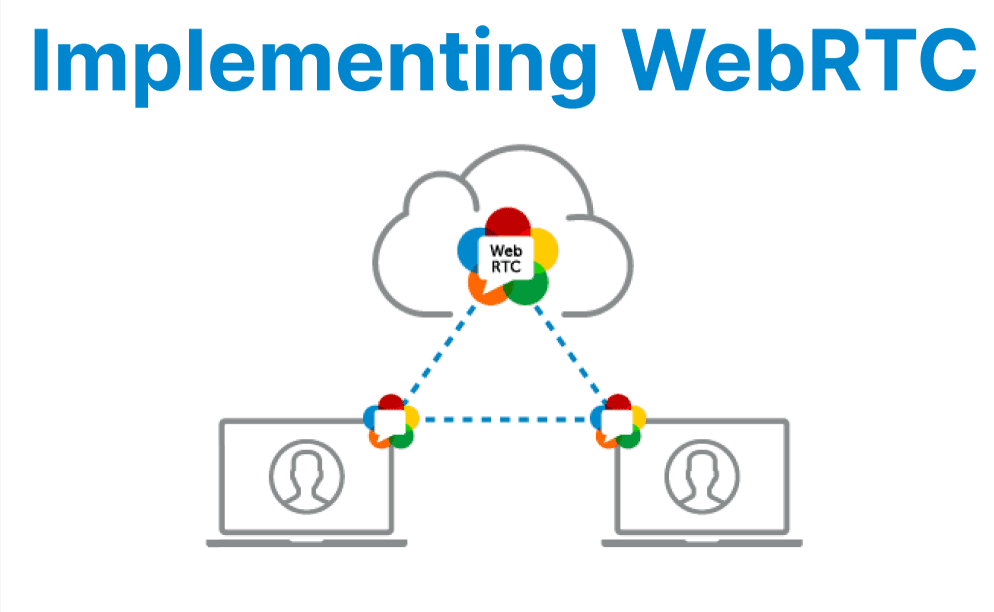
WebRTC (Web Real-Time Communication) enables direct peer-to-peer transmission of audio, video, and arbitrary data between browsers or devices. It leverages standardized JavaScript APIs to establish and maintain secure, low-latency connections without requiring plugins.
Key to WebRTC is its use of interactive connectivity establishment (ICE), session description protocol (SDP) negotiation, and NAT traversal mechanisms (STUN/TURN servers).
Core WebRTC Components
RTCPeerConnection
This is the primary interface for managing the connection lifecycle between two peers. It handles the negotiation, media, data channels, and connection state and error events. Instantiation requires a configuration object, typically specifying STUN and/or TURN servers for NAT traversal:
const configuration = {
iceServers: [
{ urls: 'stun:stun.l.google.com:19302' },
{ urls: 'turn:your-turn-server.com', username: 'user', credential: 'pass' }
]
};
const peerConnection = new RTCPeerConnection(configuration);
RTCDataChannel
Enables bidirectional data transfer (e.g., text, files) between peers. Data channels are created on the peer connection and can be used independently of media streams:
const dataChannel = peerConnection.createDataChannel("chat");
dataChannel.onmessage = event => {
// Handle incoming data
};
RTCIceCandidate
ICE candidates describe potential network paths for connectivity. The ICE process discovers and exchanges these candidates through signaling, optimizing for the best available route:
peerConnection.onicecandidate = event => {
if (event.candidate) {
// Send candidate to remote peer via signaling
}
};
Step-by-Step Implementation
1. Capture Media
To stream audio and video, the application must access local media devices using the getUserMedia() API. Once acquired, media streams are added to the peer connection and can be rendered locally for preview. Proper permissions and error handling ensure smooth user experience.
navigator.mediaDevices.getUserMedia({ video: true, audio: true })
.then(stream => {
localVideo.srcObject = stream;
peerConnection.addStream(stream);
});
- Captures local media using getUserMedia().
- Adds the stream to the peer connection.
2. Establish Signaling Mechanism
WebRTC requires an external signaling server (e.g., WebSocket or WebRTC SFU) to exchange Session Description Protocol (SDP) offers/answers and ICE candidates.
Example structure:
// pseudo code for signaling
socket.on('offer', async (offer) => {
await peerConnection.setRemoteDescription(offer);
const answer = await peerConnection.createAnswer();
await peerConnection.setLocalDescription(answer);
socket.emit('answer', answer);
});
- Handles SDP negotiation.
- Transfers ICE candidates for connectivity checks.
3. Create Peer Connection
After instantiation, the RTCPeerConnection gathers ICE candidates asynchronously. These must be sent to the remote peer via the signaling server to facilitate NAT traversal and connection establishment.
const peerConnection = new RTCPeerConnection(config);- Configuration includes ICE servers (STUN/TURN).
- Handles negotiationneeded, icecandidate, track, etc.
peerConnection.onicecandidate = ({ candidate }) => {
if (candidate) {
socket.emit('ice-candidate', candidate);
}
};
4. Handle Remote Media
When the remote peer adds media tracks, the local application receives ontrack events. These provide access to remote media streams, which should be assigned to UI elements for playback.
peerConnection.ontrack = (event) => {
remoteVideo.srcObject = event.streams[0];
};
- Receives media from the remote peer.
- Assigns it to a video element for playback.
Bandwidth Management and QoS
Control over bandwidth usage is critical for adapting to network conditions. WebRTC allows modification of the SDP offer to include bandwidth constraints using the b=AS: attribute. This effectively limits the bitrate for specific media streams, helping prevent congestion.
peerConnection.createOffer().then(offer => {
return peerConnection.setLocalDescription(
new RTCSessionDescription({
type: offer.type,
sdp: offer.sdp.replace(/a=mid:video\r\n/g, 'a=mid:video\r\nb=AS:500\r\n')
})
);
});
Error Handling and Recovery
The ICE connection may experience failures due to network changes or interruptions. Monitoring the connection state allows the application to attempt recovery by restarting the ICE process without tearing down the entire peer connection.
peerConnection.oniceconnectionstatechange = () => {
if (peerConnection.iceConnectionState === "failed") {
peerConnection.restartIce();
}
};
Metrics and Debugging
Detailed statistics on connection health, packet loss, jitter, and round-trip time can be gathered via WebRTC's getStats() API. Regular polling enables dynamic monitoring and troubleshooting.
peerConnection.addEventListener("icecandidate", event => {
if (event.candidate) console.log("ICE candidate:", event.candidate);
});
Use getStats() for real-time performance data:
setInterval(async () => {
const stats = await peerConnection.getStats();
stats.forEach(report => {
if (report.type === "inbound-rtp") console.log("Packet loss:", report.packetsLost);
});
}, 1000);